

Enterprise feature. This is part of OpenLIT Enterprise and needs an enterprise license applied to your organisation; the community edition doesn’t include it. Book a call or email developers@openlit.io to get access to the enterprise build and a license.
Availability
RBAC requires an active enterprise license or entitlement for the organisation. Without the paid RBAC entitlement:- Existing built-in roles continue to work.
- Owners and admins can continue using OpenLIT as before.
- Enterprise-only RBAC APIs and UI actions return upgrade-required or forbidden responses where appropriate.
- Role-management permissions are not granted through the default built-in role set.
Access hierarchy
OpenLIT access is evaluated within this hierarchy:Enforcement model
RBAC is enforced on both the UI and the server.- Frontend page gates hide protected feature surfaces and render the same access-denied pattern used by other enterprise feature locks.
- Backend route wrappers enforce the organisation permission before returning data or mutating state.
- Database-backed observability, prompt, agent, and evaluation routes also validate access to the active project database configuration.
- Organisation-level features such as Roles and Audit Logs do not require a project, but still require the organisation entitlement and permission.
Project and database configuration access
Projects are the boundary for database configuration access.- Existing organisation members are backfilled into the organisation’s projects during migration so existing data remains visible after the project layer is introduced.
- New organisation-only invites grant access to the organisation, but not to project data.
- New project invites grant access to the organisation and to the invited project.
- Database configuration selection is stored per user and scoped to the currently selected project.
- Users without project access see a no-access state instead of telemetry, prompt, evaluation, vault, OpenGround, or dashboard data.
OPENLIT_ALLOW_UNAUTHENTICATED_CONTROLLER_BOOTSTRAP=true is set for a deployment.
API key access
With the RBAC entitlement, each API key can be restricted to specific features from Settings → API Keys, either when the key is created or later with Edit access. A key has either:- Full access: the key can use every feature that accepts API keys. All keys created before this feature, and every key in the community edition, have full access.
- Restricted: the key can only use the selected features.
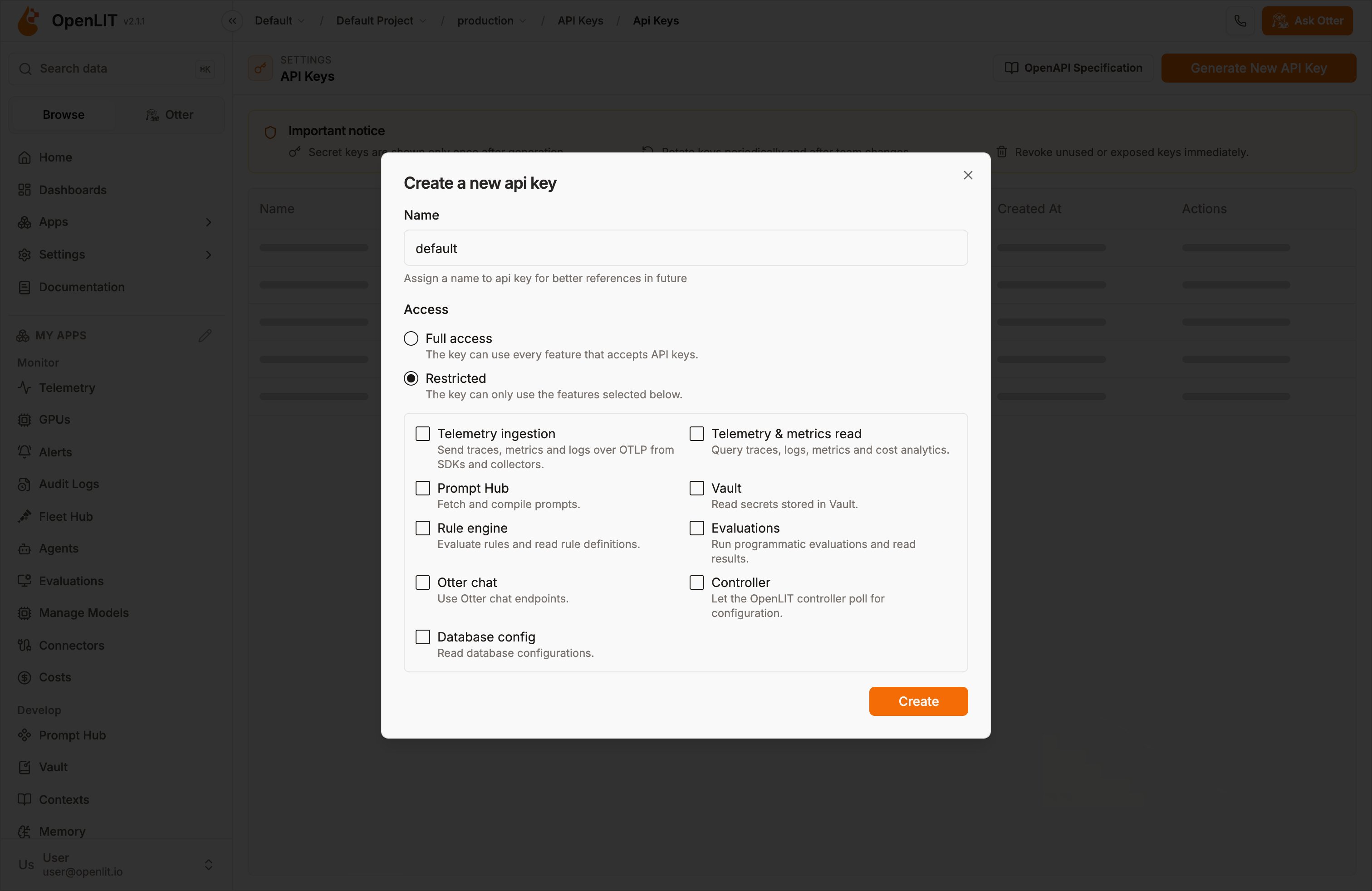
- A request with a restricted key to a feature it was not granted returns
403. Routes that no feature covers are denied, so restricted keys fail closed. - A user can only grant features their own role includes. If the role doesn’t include every feature, the user can only create restricted keys.
- Creating a key requires
api_key:create. Editing a key’s access requiresapi_key:update, which existing roles withapi_key:createreceive automatically. API key management (/api/api-key) requires a signed-in user, so an API key can’t list, create, change, or delete keys, including its own. - Access changes take effect immediately for API requests. The OTLP receiver caches key lookups, so ingestion changes can take up to 30 seconds.
- If the RBAC license is revoked, restrictions on existing keys stay in force. New keys, and access edits, are full access only until the license is reapplied.
- To manage access programmatically, see Create API Key and Update API Key Access.
- Key creation and access changes are recorded as
api_key.createdandapi_key.access_updatedaudit events. Access changes also emit anapi_key_access_updatedevent on the API keys alert trigger, withaccessandfeaturesfields.
Roles page
Open the RBAC management page from Roles in the sidebar.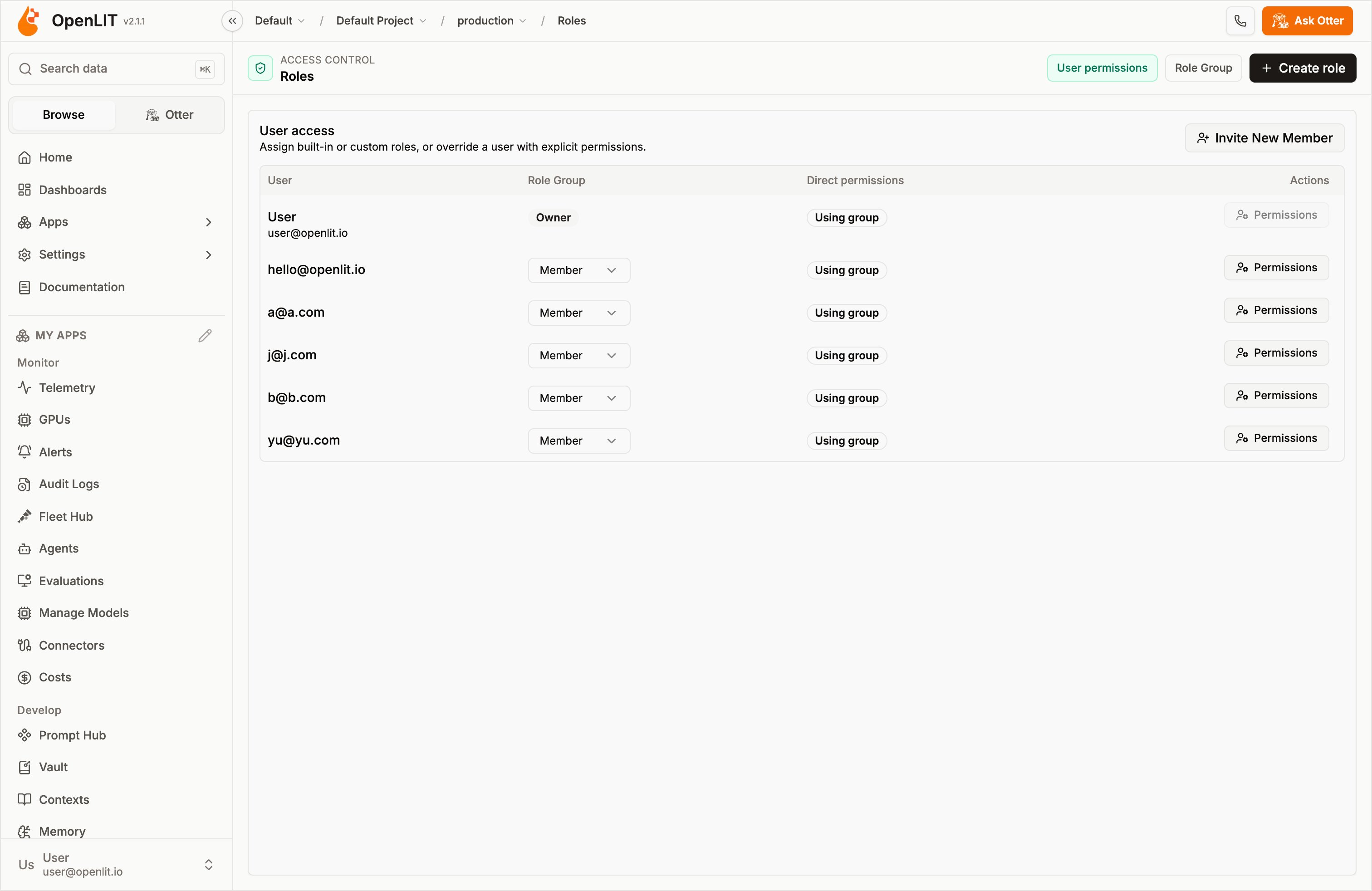
- User permissions: Assign built-in roles or custom role groups to members, and optionally set direct permissions for a specific user.
- Role Group: Create, edit, delete, and inspect role groups.
Built-in roles
OpenLIT keeps the built-in organisation roles:
The organisation creator is treated as the owner even if membership data is inconsistent.
Role groups
Role groups are reusable custom permission sets. Use role groups when multiple users need the same access profile, such as support, security reviewer, billing admin, or read-only operator.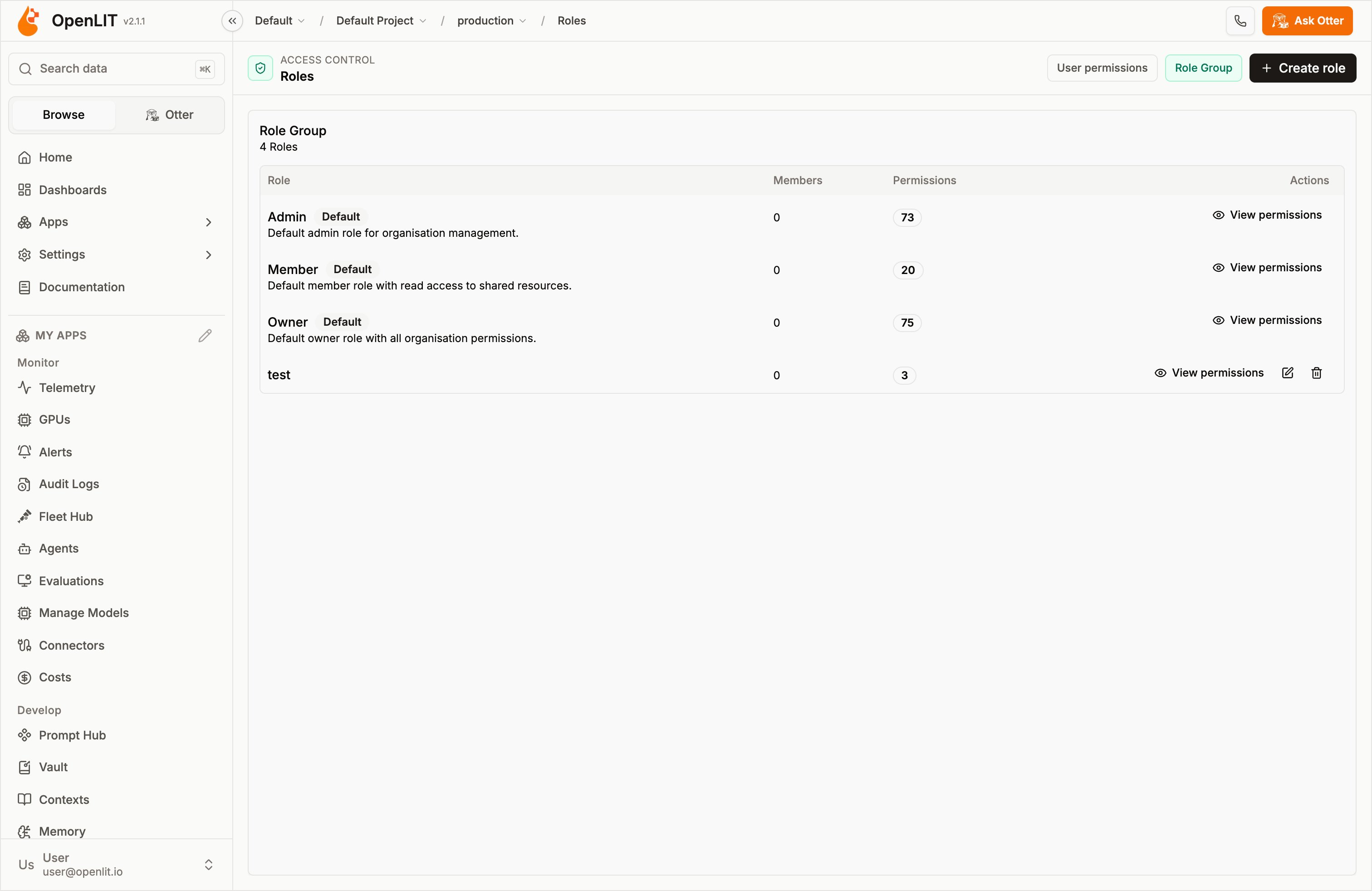
- Create a role group with a name, optional description, and selected permissions.
- Edit a non-system role group.
- Delete a non-system role group. Deleting a role clears that role from assigned members.
- View the permissions granted by any existing role group, including default/system roles.
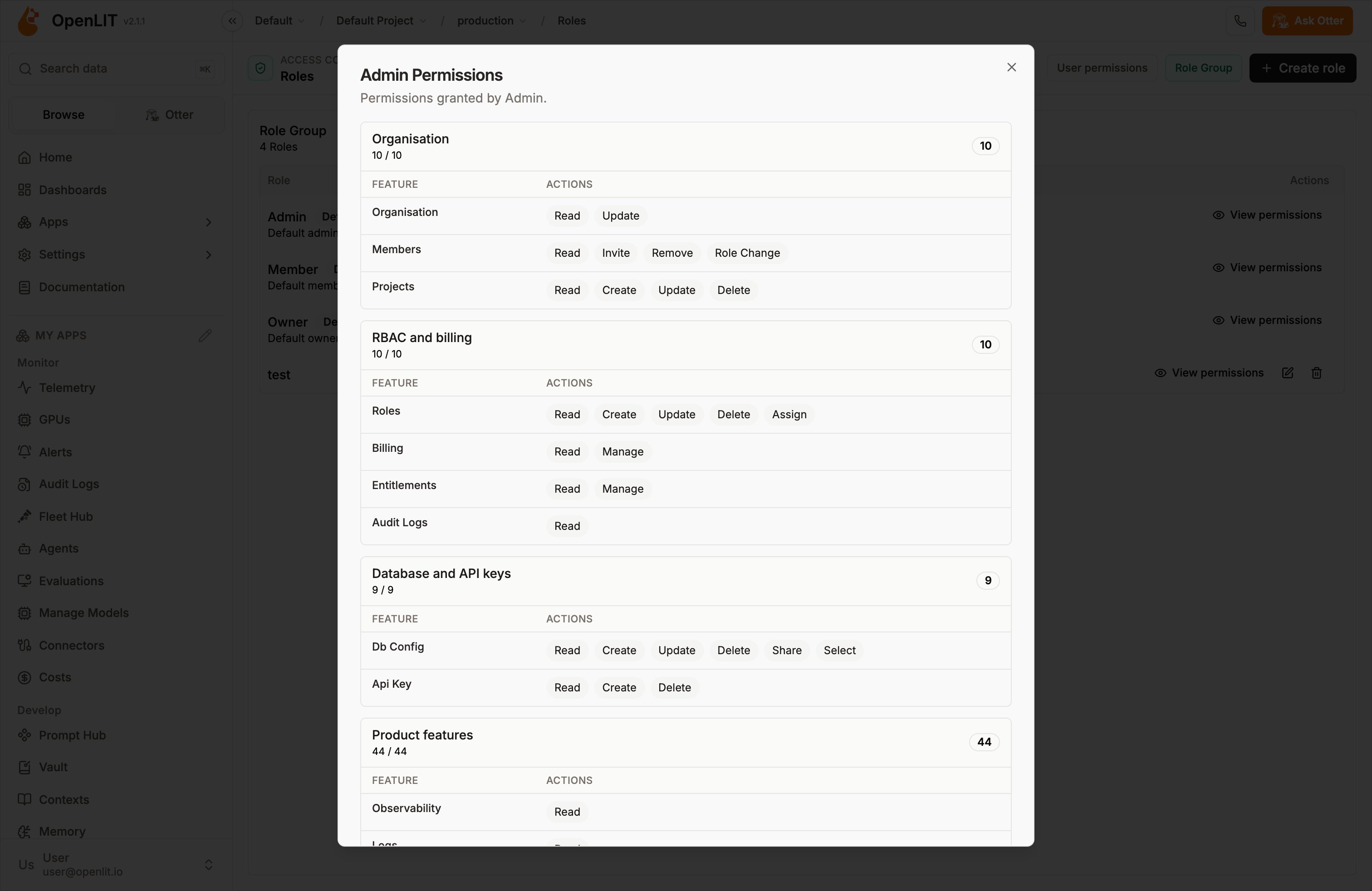
Direct user permissions
Direct user permissions override the member’s assigned role group. Use direct permissions sparingly for exceptions, temporary access, or one-off support cases. Prefer role groups when the same permission set applies to more than one user. Safeguards:- Users cannot override their own direct permissions.
- Owner permissions cannot be overridden.
- Direct permission writes require the RBAC entitlement and the required assignment permission.
- Direct permissions are removed when the RBAC license is revoked.
Permission precedence
OpenLIT resolves permissions in this order:- Owner access always receives the owner permission set.
- If RBAC is enabled and direct user permissions exist, direct permissions are used.
- If RBAC is enabled and a custom role group is assigned, the role group’s permissions are used.
- Otherwise, OpenLIT falls back to the built-in role permissions.
License revocation behavior
RBAC is a paid feature. When the RBAC license or entitlement is revoked:- Custom role assignments are cleared from members.
- Direct user permission overrides are deleted.
- Built-in roles continue to work.
- Existing organisations, projects, database configurations, licenses, and default data remain available.
Auditing
RBAC-sensitive changes are covered by enterprise audit logging when audit logging is entitled for the organisation. Audited operations include role changes, role group changes, direct permission updates, license changes, and related privileged organisation operations. Audit write failures emit a security-prefixed error signal while preserving the original API response.Recommended setup
1
Confirm the organisation has RBAC entitlement
Apply an enterprise license that includes RBAC, then switch to the target organisation.
2
Review built-in roles
Open Roles → Role Group and use View permissions to inspect the default roles.
3
Create reusable role groups
Create custom role groups for repeated access profiles instead of assigning direct permissions to every user.
4
Assign users
Open Roles → User permissions and assign each member a built-in role or custom role group.
5
Use direct permissions only for exceptions
Override a user’s permissions only when the assigned role group is not specific enough.
6
Verify audit coverage
If your organisation uses audit logs for compliance, confirm audit logging is entitled and review RBAC changes in Audit Logs.
OpenLIT Enterprise
Enterprise features, licensing, and how to get access
Organisation management
Manage organisations, projects, invitations, and built-in roles
Configuration
Configure OpenLIT deployment and runtime settings