

OpenLIT automatically instruments LLMs, VectorDBs, MCP, and frameworks by default.
1
Deploy OpenLIT
1
Git clone OpenLIT repository
2
Start Docker Compose
From the root directory of the OpenLIT Repo, Run the below command:
2
Install OpenLIT SDK
- Python
- Typescript
3
Instrument your AI application
- Python
- Typescript
OpenLIT captures prompt and completion content on spans by default (
capture_message_content=True). Pass capture_message_content=False to keep that content out of your traces, max_content_length to truncate it, or guards=[openlit.PII(action="redact")] to redact sensitive values before a prompt is sent and recorded — today that rewrite only reaches single-message prompts, so do not rely on it for a multi-turn conversation. See Disable Tracing of Content, Limit Content Length, Guardrails and the full Configuration reference.- Manual instrumentation
- Zero-code instrumentation
- Via function parameters
- Via environment variables
4
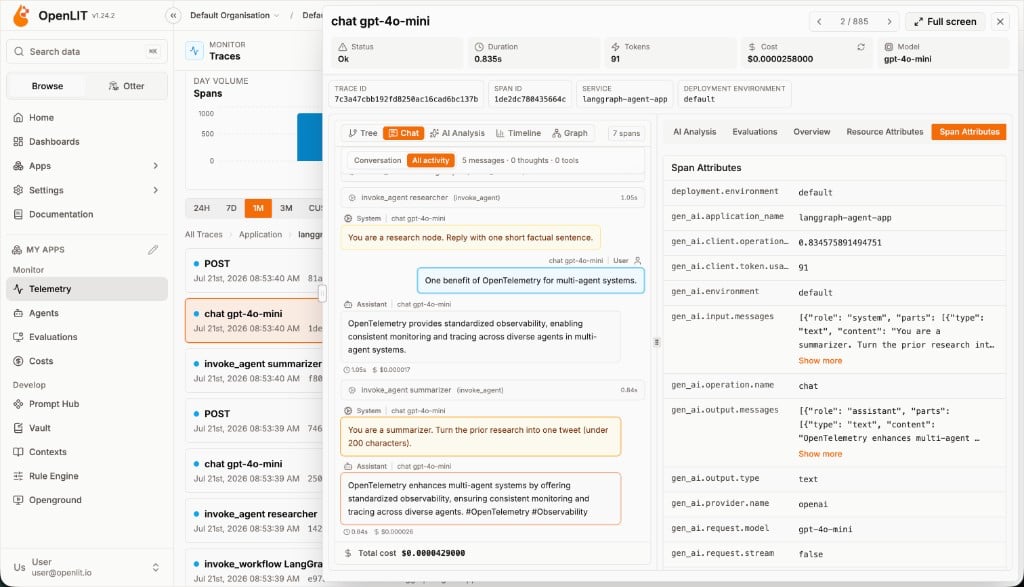
Monitor, debug and test the quality of your AI applications
With real-time LLM observability data now flowing to OpenLIT, visualize comprehensive AI performance metrics including token costs, latency patterns, hallucination rates, and model accuracy to optimize your production AI applications.Just head over to OpenLIT at
127.0.0.1:3000 on your browser to start exploring. You can login using the default credentials- Email:
user@openlit.io - Password:
openlituser
Quickstart: LLM Evaluations
Get started with evaluating your LLM responses in 2 simple steps
Integrations
60+ AI integrations with automatic instrumentation and performance tracking
Create a dashboard
Create custom visualizations with flexible widgets, queries, and real-time AI monitoring