> ## Documentation Index
> Fetch the complete documentation index at: https://docs.openlit.io/llms.txt
> Use this file to discover all available pages before exploring further.
# SigNoz
> LLM Observability with SigNoz and OpenLIT
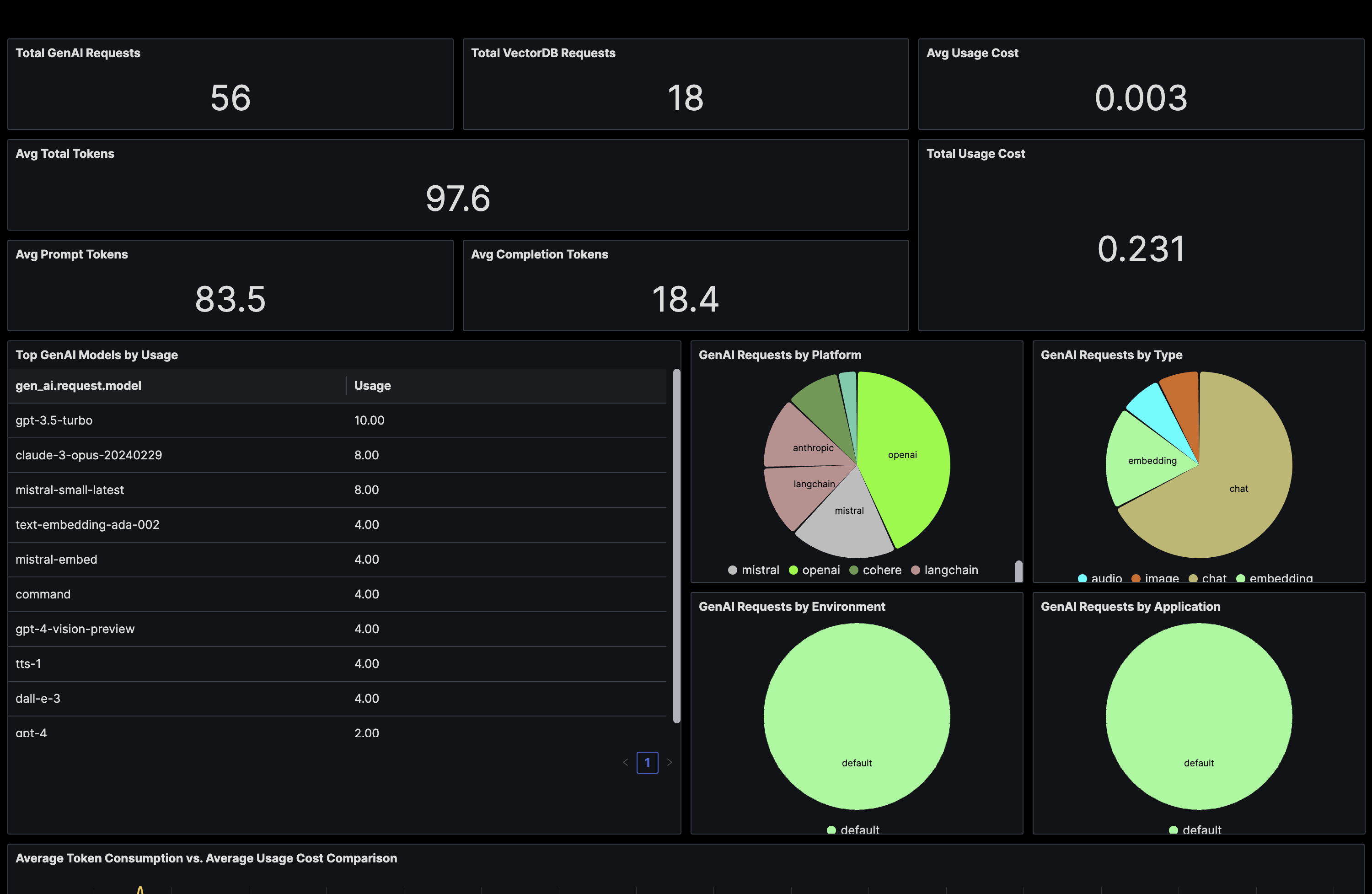
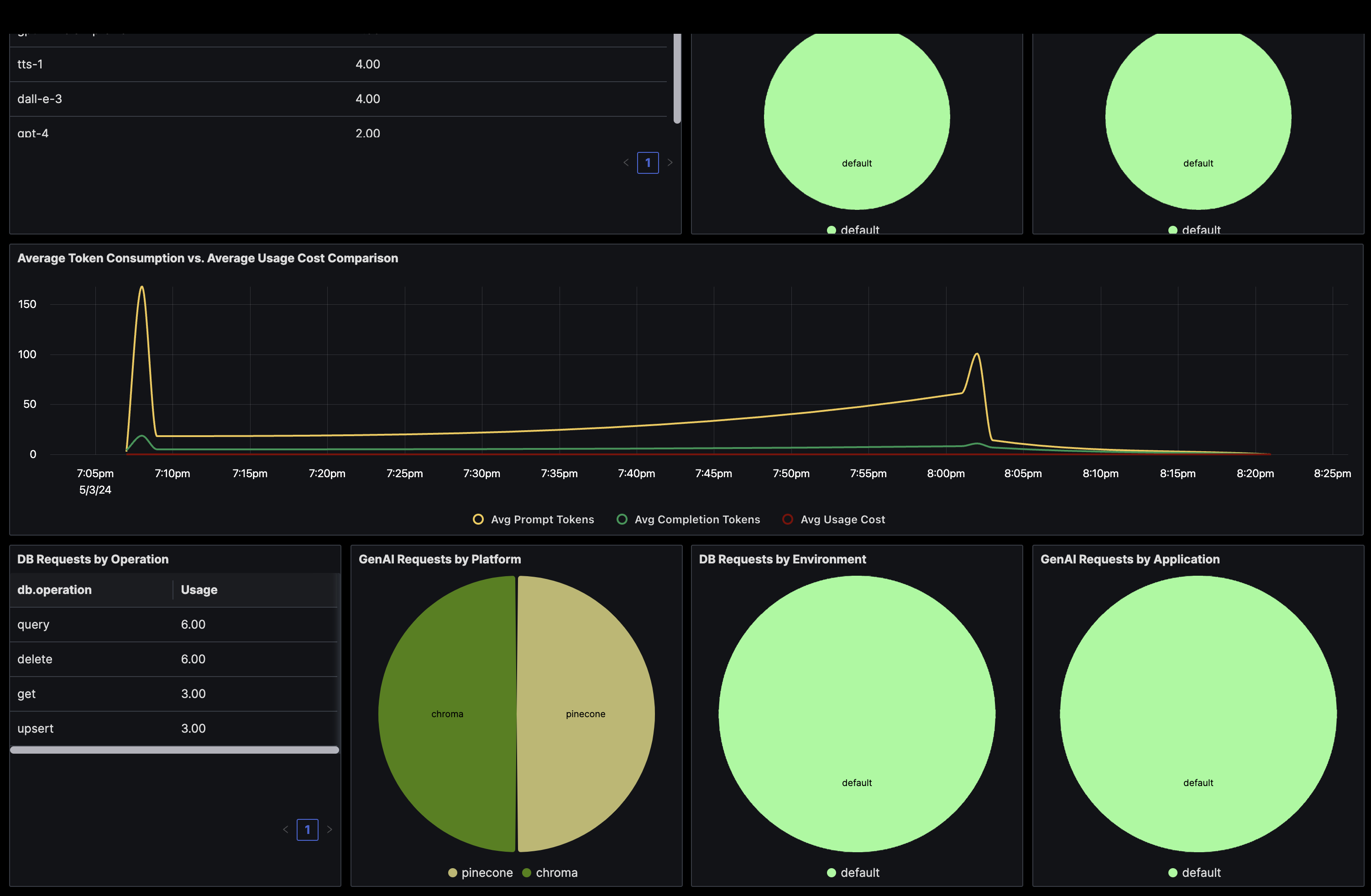 To directly send OpenTelemetry metrics and traces generated by OpenLIT from your AI Application to SigNoz, follow the below steps.
### 1. Get your Credentials
SigNoz configuration requires two values:
1. **SigNoz Endpoint**: Your SigNoz instance endpoint URL
* **SigNoz Cloud**: `https://ingest.{region}.signoz.cloud:443`
* **Self-Hosted**: `http://your-signoz-host:4318` (or your custom endpoint)
2. **Ingestion Key**: Your SigNoz access token for authentication
* **SigNoz Cloud**: Available in your SigNoz Cloud settings → Ingestion Keys
* **Self-Hosted**: Set up according to your SigNoz deployment configuration
For SigNoz Cloud users, you can find your specific endpoint and ingestion key in your SigNoz Cloud dashboard under **Settings** → **Ingestion Keys**.
### 2. Instrument your application
**For direct integration into your Python applications:**
```python theme={null}
import openlit
openlit.init(
otlp_endpoint="SIGNOZ_ENDPOINT",
otlp_headers="signoz-access-token=SIGNOZ_INGESTION_KEY"
)
```
Replace:
1. `SIGNOZ_ENDPOINT` with your SigNoz endpoint URL.
* Example: `https://ingest.{region}.signoz.cloud:443`
2. `SIGNOZ_INGESTION_KEY` with the access token provided by SigNoz.
* Example: `896cc137-xxxx-xxxx-b8a0-a6d7ab65f274`
```python theme={null}
import openlit
openlit.init()
```
Set these environment variables:
```shell theme={null}
export OTEL_EXPORTER_OTLP_ENDPOINT="SIGNOZ_ENDPOINT"
export OTEL_EXPORTER_OTLP_HEADERS="signoz-access-token=SIGNOZ_INGESTION_KEY"
```
Replace:
1. `SIGNOZ_ENDPOINT` with your SigNoz endpoint URL.
* Example: `https://ingest.{region}.signoz.cloud:443`
2. `SIGNOZ_INGESTION_KEY` with the access token provided by SigNoz.
* Example: `896cc137-xxxx-xxxx-b8a0-a6d7ab65f274`
Refer to the OpenLIT [Python SDK repository](https://github.com/openlit/openlit/tree/main/sdk/python) for more advanced configurations and use cases.
**For zero-code auto-instrumentation via command line:**
```shell theme={null}
# Using CLI arguments
openlit-instrument \
--otlp-endpoint "SIGNOZ_ENDPOINT" \
--otlp-headers "signoz-access-token=SIGNOZ_INGESTION_KEY" \
--service-name "my-ai-service" \
--deployment-environment "production" \
python app.py
```
Replace:
1. `SIGNOZ_ENDPOINT` with your SigNoz endpoint URL.
* Example: `https://ingest.{region}.signoz.cloud:443`
2. `SIGNOZ_INGESTION_KEY` with the access token provided by SigNoz.
* Example: `896cc137-xxxx-xxxx-b8a0-a6d7ab65f274`
```shell theme={null}
# Set environment variables (takes precedence over CLI args)
export OTEL_EXPORTER_OTLP_ENDPOINT="SIGNOZ_ENDPOINT"
export OTEL_EXPORTER_OTLP_HEADERS="signoz-access-token=SIGNOZ_INGESTION_KEY"
export OTEL_SERVICE_NAME="my-ai-service"
export OTEL_DEPLOYMENT_ENVIRONMENT="production"
# Run your application
openlit-instrument python app.py
```
Replace:
1. `SIGNOZ_ENDPOINT` with your SigNoz endpoint URL.
* Example: `https://ingest.{region}.signoz.cloud:443`
2. `SIGNOZ_INGESTION_KEY` with the access token provided by SigNoz.
* Example: `896cc137-xxxx-xxxx-b8a0-a6d7ab65f274`
Refer to the OpenLIT [Python SDK repository](https://github.com/openlit/openlit/tree/main/sdk/python) for more advanced configurations and use cases.
### 3. Import the pre-built Dashboard
1. Log into your SigNoz Instance.
2. From the sidebar, choose **Dashboards**.
3. Click **Create new dashboard** button and select **Import JSON** in the drop-down menu.
4. Copy the GenAI Observability dashboard JSON provided [here](https://raw.githubusercontent.com/openlit/openlit/main/assets/signoz-openlit.json).
1. To get the GPU Monitoring dashboard, copy the dashboard JSON provided [here](https://raw.githubusercontent.com/openlit/openlit/main/assets/signoz-gpu-dashboard.json)
5. Paste the dashboard JSON text directly into the text area.
6. Click **Load Json**.
To directly send OpenTelemetry metrics and traces generated by OpenLIT from your AI Application to SigNoz, follow the below steps.
### 1. Get your Credentials
SigNoz configuration requires two values:
1. **SigNoz Endpoint**: Your SigNoz instance endpoint URL
* **SigNoz Cloud**: `https://ingest.{region}.signoz.cloud:443`
* **Self-Hosted**: `http://your-signoz-host:4318` (or your custom endpoint)
2. **Ingestion Key**: Your SigNoz access token for authentication
* **SigNoz Cloud**: Available in your SigNoz Cloud settings → Ingestion Keys
* **Self-Hosted**: Set up according to your SigNoz deployment configuration
For SigNoz Cloud users, you can find your specific endpoint and ingestion key in your SigNoz Cloud dashboard under **Settings** → **Ingestion Keys**.
### 2. Instrument your application
**For direct integration into your Python applications:**
```python theme={null}
import openlit
openlit.init(
otlp_endpoint="SIGNOZ_ENDPOINT",
otlp_headers="signoz-access-token=SIGNOZ_INGESTION_KEY"
)
```
Replace:
1. `SIGNOZ_ENDPOINT` with your SigNoz endpoint URL.
* Example: `https://ingest.{region}.signoz.cloud:443`
2. `SIGNOZ_INGESTION_KEY` with the access token provided by SigNoz.
* Example: `896cc137-xxxx-xxxx-b8a0-a6d7ab65f274`
```python theme={null}
import openlit
openlit.init()
```
Set these environment variables:
```shell theme={null}
export OTEL_EXPORTER_OTLP_ENDPOINT="SIGNOZ_ENDPOINT"
export OTEL_EXPORTER_OTLP_HEADERS="signoz-access-token=SIGNOZ_INGESTION_KEY"
```
Replace:
1. `SIGNOZ_ENDPOINT` with your SigNoz endpoint URL.
* Example: `https://ingest.{region}.signoz.cloud:443`
2. `SIGNOZ_INGESTION_KEY` with the access token provided by SigNoz.
* Example: `896cc137-xxxx-xxxx-b8a0-a6d7ab65f274`
Refer to the OpenLIT [Python SDK repository](https://github.com/openlit/openlit/tree/main/sdk/python) for more advanced configurations and use cases.
**For zero-code auto-instrumentation via command line:**
```shell theme={null}
# Using CLI arguments
openlit-instrument \
--otlp-endpoint "SIGNOZ_ENDPOINT" \
--otlp-headers "signoz-access-token=SIGNOZ_INGESTION_KEY" \
--service-name "my-ai-service" \
--deployment-environment "production" \
python app.py
```
Replace:
1. `SIGNOZ_ENDPOINT` with your SigNoz endpoint URL.
* Example: `https://ingest.{region}.signoz.cloud:443`
2. `SIGNOZ_INGESTION_KEY` with the access token provided by SigNoz.
* Example: `896cc137-xxxx-xxxx-b8a0-a6d7ab65f274`
```shell theme={null}
# Set environment variables (takes precedence over CLI args)
export OTEL_EXPORTER_OTLP_ENDPOINT="SIGNOZ_ENDPOINT"
export OTEL_EXPORTER_OTLP_HEADERS="signoz-access-token=SIGNOZ_INGESTION_KEY"
export OTEL_SERVICE_NAME="my-ai-service"
export OTEL_DEPLOYMENT_ENVIRONMENT="production"
# Run your application
openlit-instrument python app.py
```
Replace:
1. `SIGNOZ_ENDPOINT` with your SigNoz endpoint URL.
* Example: `https://ingest.{region}.signoz.cloud:443`
2. `SIGNOZ_INGESTION_KEY` with the access token provided by SigNoz.
* Example: `896cc137-xxxx-xxxx-b8a0-a6d7ab65f274`
Refer to the OpenLIT [Python SDK repository](https://github.com/openlit/openlit/tree/main/sdk/python) for more advanced configurations and use cases.
### 3. Import the pre-built Dashboard
1. Log into your SigNoz Instance.
2. From the sidebar, choose **Dashboards**.
3. Click **Create new dashboard** button and select **Import JSON** in the drop-down menu.
4. Copy the GenAI Observability dashboard JSON provided [here](https://raw.githubusercontent.com/openlit/openlit/main/assets/signoz-openlit.json).
1. To get the GPU Monitoring dashboard, copy the dashboard JSON provided [here](https://raw.githubusercontent.com/openlit/openlit/main/assets/signoz-gpu-dashboard.json)
5. Paste the dashboard JSON text directly into the text area.
6. Click **Load Json**.