> ## Documentation Index
> Fetch the complete documentation index at: https://docs.openlit.io/llms.txt
> Use this file to discover all available pages before exploring further.
# OpenObserve
> LLM Observability with OpenObserve and OpenLIT
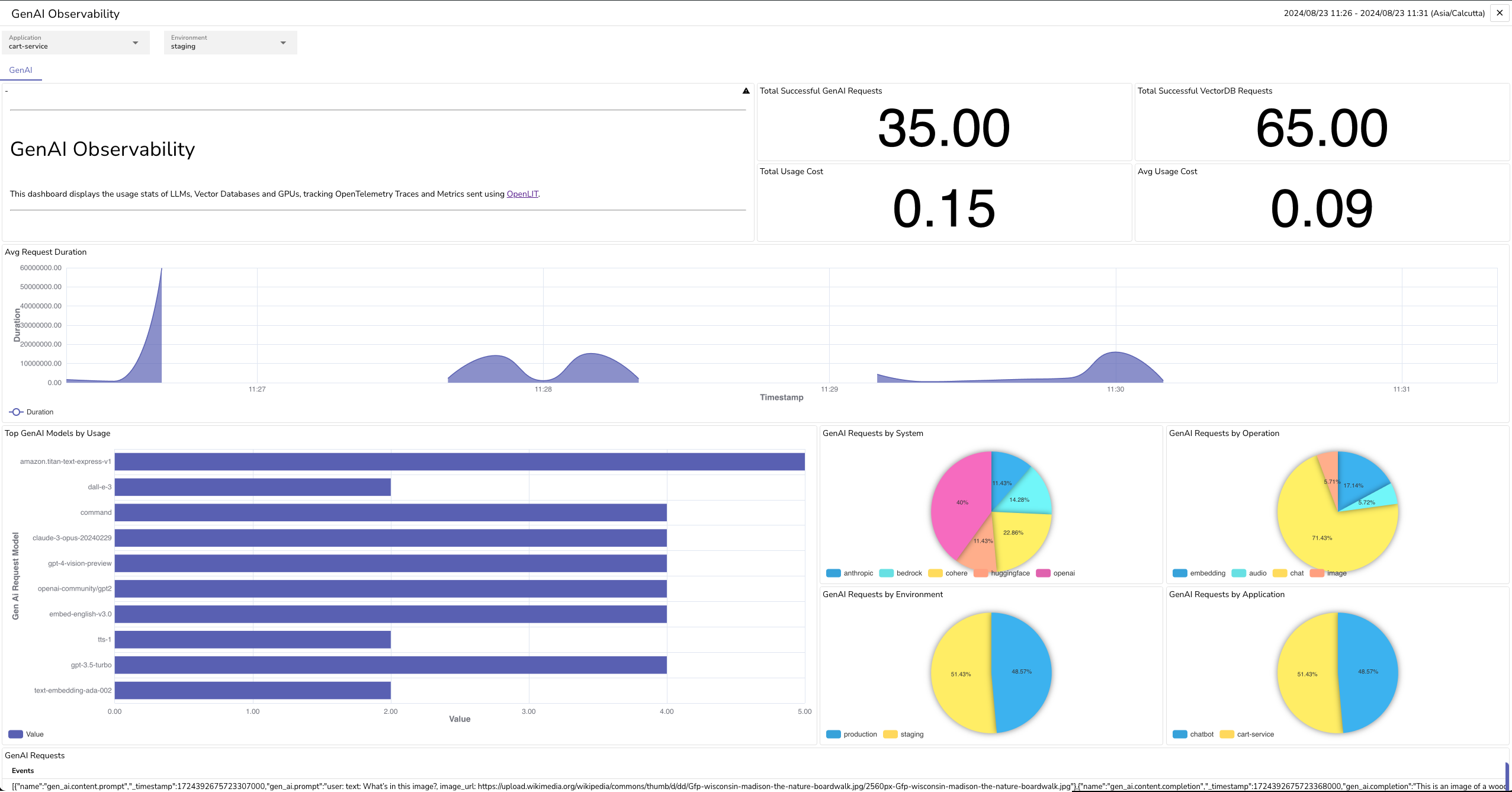
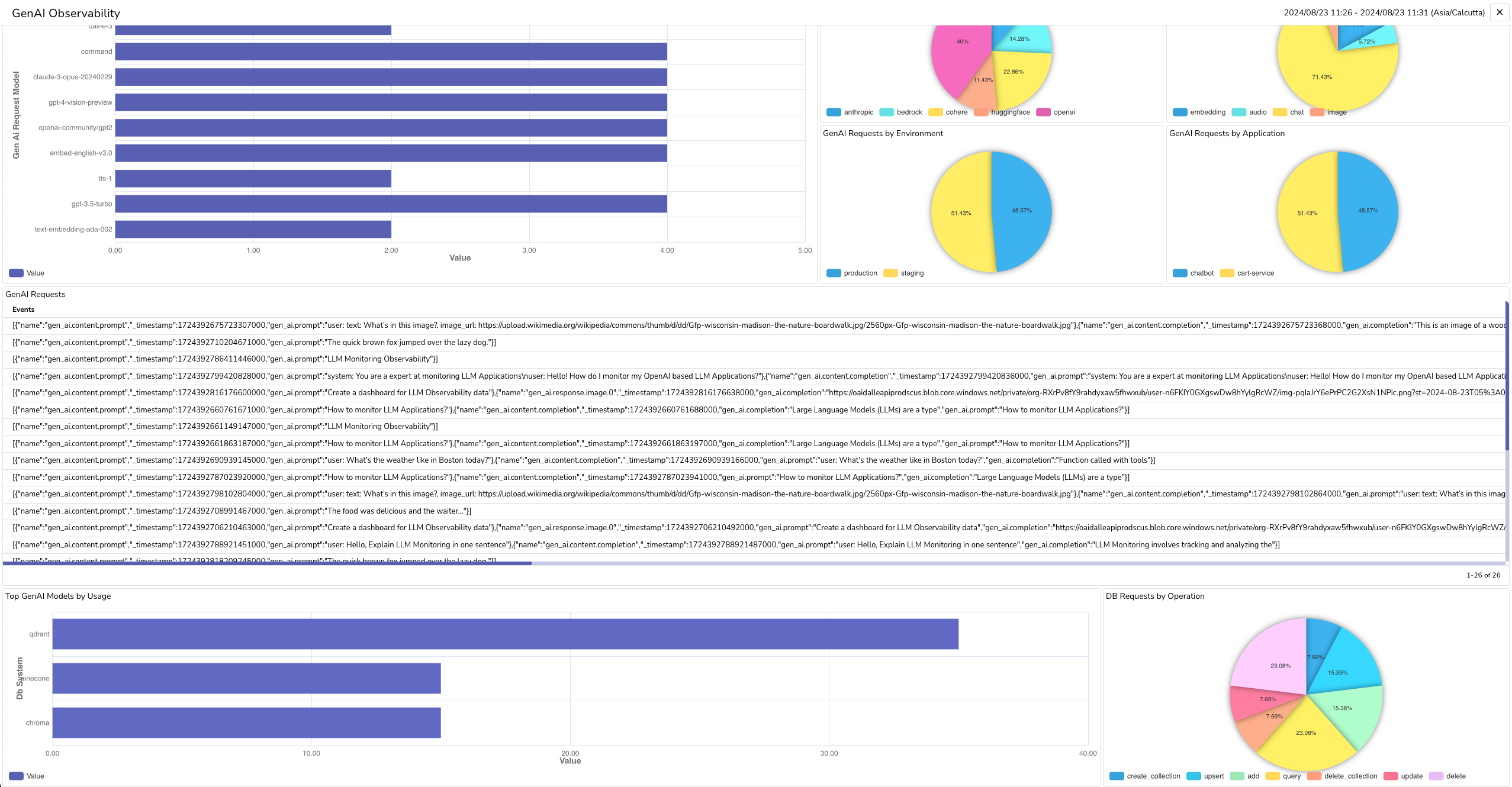 To send OpenTelemetry metrics and traces generated by OpenLIT from your AI Application to OpenObserve, follow the below steps.
### 1. Get your Credentials
1. **Log into your OpenObserve instance**
2. **Navigate to Ingestion**:
* Click **Ingestion** in the side navigation
* Select **Traces (OpenTelemetry)** option
3. **Copy OTLP Configuration**:
* Under the **OTLP HTTP** section, copy:
* **Ingestion HTTP Endpoint**
* **Ingestion Authorization key** (the part after `Basic`)
* Example endpoint: `http://127.0.0.1:5080/api/default`
* Example auth: `Authorization=Basic%20`
### 2. Instrument your application
**For direct integration into your Python applications:**
```python theme={null}
import openlit
openlit.init(
otlp_endpoint="YOUR_OPENOBSERVE_HTTP_ENDPOINT",
otlp_headers="YOUR_OPENOBSERVE_AUTH_HEADER"
)
```
Replace:
1. `YOUR_OPENOBSERVE_HTTP_ENDPOINT` with the Ingestion HTTP Endpoint value you copied in Step 1.
* Example: `http://127.0.0.1:5080/api/default`
2. `YOUR_OPENOBSERVE_AUTH_HEADER` with the Ingestion Authorization key value you copied in Step 1.
* Example: `Authorization=Basic%20`
```python theme={null}
import openlit
openlit.init()
```
Set these environment variables:
```shell theme={null}
export OTEL_EXPORTER_OTLP_ENDPOINT="YOUR_OPENOBSERVE_HTTP_ENDPOINT"
export OTEL_EXPORTER_OTLP_HEADERS="YOUR_OPENOBSERVE_AUTH_HEADER"
```
Replace:
1. `YOUR_OPENOBSERVE_HTTP_ENDPOINT` with the Ingestion HTTP Endpoint value you copied in Step 1.
* Example: `http://127.0.0.1:5080/api/default`
2. `YOUR_OPENOBSERVE_AUTH_HEADER` with the Ingestion Authorization key value you copied in Step 1.
* Example: `Authorization=Basic%20`
Refer to the OpenLIT [Python SDK repository](https://github.com/openlit/openlit/tree/main/sdk/python) for more advanced configurations and use cases.
**For zero-code auto-instrumentation via command line:**
```shell theme={null}
# Using CLI arguments
openlit-instrument \
--otlp-endpoint "YOUR_OPENOBSERVE_HTTP_ENDPOINT" \
--otlp-headers "YOUR_OPENOBSERVE_AUTH_HEADER" \
--service-name "my-ai-service" \
--deployment-environment "production" \
python app.py
```
Replace:
1. `YOUR_OPENOBSERVE_HTTP_ENDPOINT` with the Ingestion HTTP Endpoint value you copied in Step 1.
* Example: `http://127.0.0.1:5080/api/default`
2. `YOUR_OPENOBSERVE_AUTH_HEADER` with the Ingestion Authorization key value you copied in Step 1.
* Example: `Authorization=Basic%20`
```shell theme={null}
# Set environment variables (takes precedence over CLI args)
export OTEL_EXPORTER_OTLP_ENDPOINT="YOUR_OPENOBSERVE_HTTP_ENDPOINT"
export OTEL_EXPORTER_OTLP_HEADERS="YOUR_OPENOBSERVE_AUTH_HEADER"
export OTEL_SERVICE_NAME="my-ai-service"
export OTEL_DEPLOYMENT_ENVIRONMENT="production"
# Run your application
openlit-instrument python app.py
```
Replace:
1. `YOUR_OPENOBSERVE_HTTP_ENDPOINT` with the Ingestion HTTP Endpoint value you copied in Step 1.
* Example: `http://127.0.0.1:5080/api/default`
2. `YOUR_OPENOBSERVE_AUTH_HEADER` with the Ingestion Authorization key value you copied in Step 1.
* Example: `Authorization=Basic%20`
Refer to the OpenLIT [Python SDK repository](https://github.com/openlit/openlit/tree/main/sdk/python) for more advanced configurations and use cases.
### 3. Import the pre-built Dashboard
1. **Log into your OpenObserve Instance**
2. **Navigate to Dashboards**:
* Click **Dashboards** in the side navigation menu
* Click **Import** on the top right corner
3. **Import Dashboard**:
* Copy the dashboard JSON provided in the accordion below
* Paste the dashboard JSON text directly under the **Import Dashboard from JSON** section
* Click **Import**
* Save the dashboard
```json theme={null}
{
"version": 4,
"dashboardId": "7232616793020301352",
"title": "GenAI Observability",
"description": "This dashboard tracks the performance of LLM and VectorDB, recording metrics like latency, tokens used, and cost. It also logs input and output data, including request IDs, timestamps, user IDs, and model versions. This helps identify how well the systems are working and where improvements can be made.",
"role": "",
"owner": "",
"created": "2024-08-23T05:46:38.299Z",
"tabs": [
{
"tabId": "default",
"name": "GenAI",
"panels": [
{
"id": "Panel_ID4678610",
"type": "metric",
"title": "Total Successful GenAI Requests",
"description": "",
"config": {
"show_legends": true,
"legend_position": "bottom",
"unit": "short",
"unit_custom": "",
"decimals": 2
},
"queryType": "promql",
"queries": [
{
"query": "sum(gen_ai_total_requests{telemetry_sdk_name=\"openlit\"})",
"customQuery": true,
"fields": {
"stream": "default",
"stream_type": "metrics",
"x": [],
"y": [],
"z": [],
"filter": []
}
}
],
"layout": {
"x": 0,
"y": 0,
"w": 8,
"h": 6,
"i": 0,
"panelType": "metric"
}
},
{
"id": "Panel_ID8765432",
"type": "metric",
"title": "Total VectorDB Requests",
"description": "",
"config": {
"show_legends": true,
"legend_position": "bottom",
"unit": "short",
"unit_custom": "",
"decimals": 2
},
"queryType": "promql",
"queries": [
{
"query": "sum(db_total_requests{telemetry_sdk_name=\"openlit\"})",
"customQuery": true,
"fields": {
"stream": "default",
"stream_type": "metrics",
"x": [],
"y": [],
"z": [],
"filter": []
}
}
],
"layout": {
"x": 8,
"y": 0,
"w": 8,
"h": 6,
"i": 1,
"panelType": "metric"
}
}
]
}
]
}
```
To send OpenTelemetry metrics and traces generated by OpenLIT from your AI Application to OpenObserve, follow the below steps.
### 1. Get your Credentials
1. **Log into your OpenObserve instance**
2. **Navigate to Ingestion**:
* Click **Ingestion** in the side navigation
* Select **Traces (OpenTelemetry)** option
3. **Copy OTLP Configuration**:
* Under the **OTLP HTTP** section, copy:
* **Ingestion HTTP Endpoint**
* **Ingestion Authorization key** (the part after `Basic`)
* Example endpoint: `http://127.0.0.1:5080/api/default`
* Example auth: `Authorization=Basic%20`
### 2. Instrument your application
**For direct integration into your Python applications:**
```python theme={null}
import openlit
openlit.init(
otlp_endpoint="YOUR_OPENOBSERVE_HTTP_ENDPOINT",
otlp_headers="YOUR_OPENOBSERVE_AUTH_HEADER"
)
```
Replace:
1. `YOUR_OPENOBSERVE_HTTP_ENDPOINT` with the Ingestion HTTP Endpoint value you copied in Step 1.
* Example: `http://127.0.0.1:5080/api/default`
2. `YOUR_OPENOBSERVE_AUTH_HEADER` with the Ingestion Authorization key value you copied in Step 1.
* Example: `Authorization=Basic%20`
```python theme={null}
import openlit
openlit.init()
```
Set these environment variables:
```shell theme={null}
export OTEL_EXPORTER_OTLP_ENDPOINT="YOUR_OPENOBSERVE_HTTP_ENDPOINT"
export OTEL_EXPORTER_OTLP_HEADERS="YOUR_OPENOBSERVE_AUTH_HEADER"
```
Replace:
1. `YOUR_OPENOBSERVE_HTTP_ENDPOINT` with the Ingestion HTTP Endpoint value you copied in Step 1.
* Example: `http://127.0.0.1:5080/api/default`
2. `YOUR_OPENOBSERVE_AUTH_HEADER` with the Ingestion Authorization key value you copied in Step 1.
* Example: `Authorization=Basic%20`
Refer to the OpenLIT [Python SDK repository](https://github.com/openlit/openlit/tree/main/sdk/python) for more advanced configurations and use cases.
**For zero-code auto-instrumentation via command line:**
```shell theme={null}
# Using CLI arguments
openlit-instrument \
--otlp-endpoint "YOUR_OPENOBSERVE_HTTP_ENDPOINT" \
--otlp-headers "YOUR_OPENOBSERVE_AUTH_HEADER" \
--service-name "my-ai-service" \
--deployment-environment "production" \
python app.py
```
Replace:
1. `YOUR_OPENOBSERVE_HTTP_ENDPOINT` with the Ingestion HTTP Endpoint value you copied in Step 1.
* Example: `http://127.0.0.1:5080/api/default`
2. `YOUR_OPENOBSERVE_AUTH_HEADER` with the Ingestion Authorization key value you copied in Step 1.
* Example: `Authorization=Basic%20`
```shell theme={null}
# Set environment variables (takes precedence over CLI args)
export OTEL_EXPORTER_OTLP_ENDPOINT="YOUR_OPENOBSERVE_HTTP_ENDPOINT"
export OTEL_EXPORTER_OTLP_HEADERS="YOUR_OPENOBSERVE_AUTH_HEADER"
export OTEL_SERVICE_NAME="my-ai-service"
export OTEL_DEPLOYMENT_ENVIRONMENT="production"
# Run your application
openlit-instrument python app.py
```
Replace:
1. `YOUR_OPENOBSERVE_HTTP_ENDPOINT` with the Ingestion HTTP Endpoint value you copied in Step 1.
* Example: `http://127.0.0.1:5080/api/default`
2. `YOUR_OPENOBSERVE_AUTH_HEADER` with the Ingestion Authorization key value you copied in Step 1.
* Example: `Authorization=Basic%20`
Refer to the OpenLIT [Python SDK repository](https://github.com/openlit/openlit/tree/main/sdk/python) for more advanced configurations and use cases.
### 3. Import the pre-built Dashboard
1. **Log into your OpenObserve Instance**
2. **Navigate to Dashboards**:
* Click **Dashboards** in the side navigation menu
* Click **Import** on the top right corner
3. **Import Dashboard**:
* Copy the dashboard JSON provided in the accordion below
* Paste the dashboard JSON text directly under the **Import Dashboard from JSON** section
* Click **Import**
* Save the dashboard
```json theme={null}
{
"version": 4,
"dashboardId": "7232616793020301352",
"title": "GenAI Observability",
"description": "This dashboard tracks the performance of LLM and VectorDB, recording metrics like latency, tokens used, and cost. It also logs input and output data, including request IDs, timestamps, user IDs, and model versions. This helps identify how well the systems are working and where improvements can be made.",
"role": "",
"owner": "",
"created": "2024-08-23T05:46:38.299Z",
"tabs": [
{
"tabId": "default",
"name": "GenAI",
"panels": [
{
"id": "Panel_ID4678610",
"type": "metric",
"title": "Total Successful GenAI Requests",
"description": "",
"config": {
"show_legends": true,
"legend_position": "bottom",
"unit": "short",
"unit_custom": "",
"decimals": 2
},
"queryType": "promql",
"queries": [
{
"query": "sum(gen_ai_total_requests{telemetry_sdk_name=\"openlit\"})",
"customQuery": true,
"fields": {
"stream": "default",
"stream_type": "metrics",
"x": [],
"y": [],
"z": [],
"filter": []
}
}
],
"layout": {
"x": 0,
"y": 0,
"w": 8,
"h": 6,
"i": 0,
"panelType": "metric"
}
},
{
"id": "Panel_ID8765432",
"type": "metric",
"title": "Total VectorDB Requests",
"description": "",
"config": {
"show_legends": true,
"legend_position": "bottom",
"unit": "short",
"unit_custom": "",
"decimals": 2
},
"queryType": "promql",
"queries": [
{
"query": "sum(db_total_requests{telemetry_sdk_name=\"openlit\"})",
"customQuery": true,
"fields": {
"stream": "default",
"stream_type": "metrics",
"x": [],
"y": [],
"z": [],
"filter": []
}
}
],
"layout": {
"x": 8,
"y": 0,
"w": 8,
"h": 6,
"i": 1,
"panelType": "metric"
}
}
]
}
]
}
```