> ## Documentation Index
> Fetch the complete documentation index at: https://docs.openlit.io/llms.txt
> Use this file to discover all available pages before exploring further.
# HyperDX
> LLM Observability with HyperDX and OpenLIT
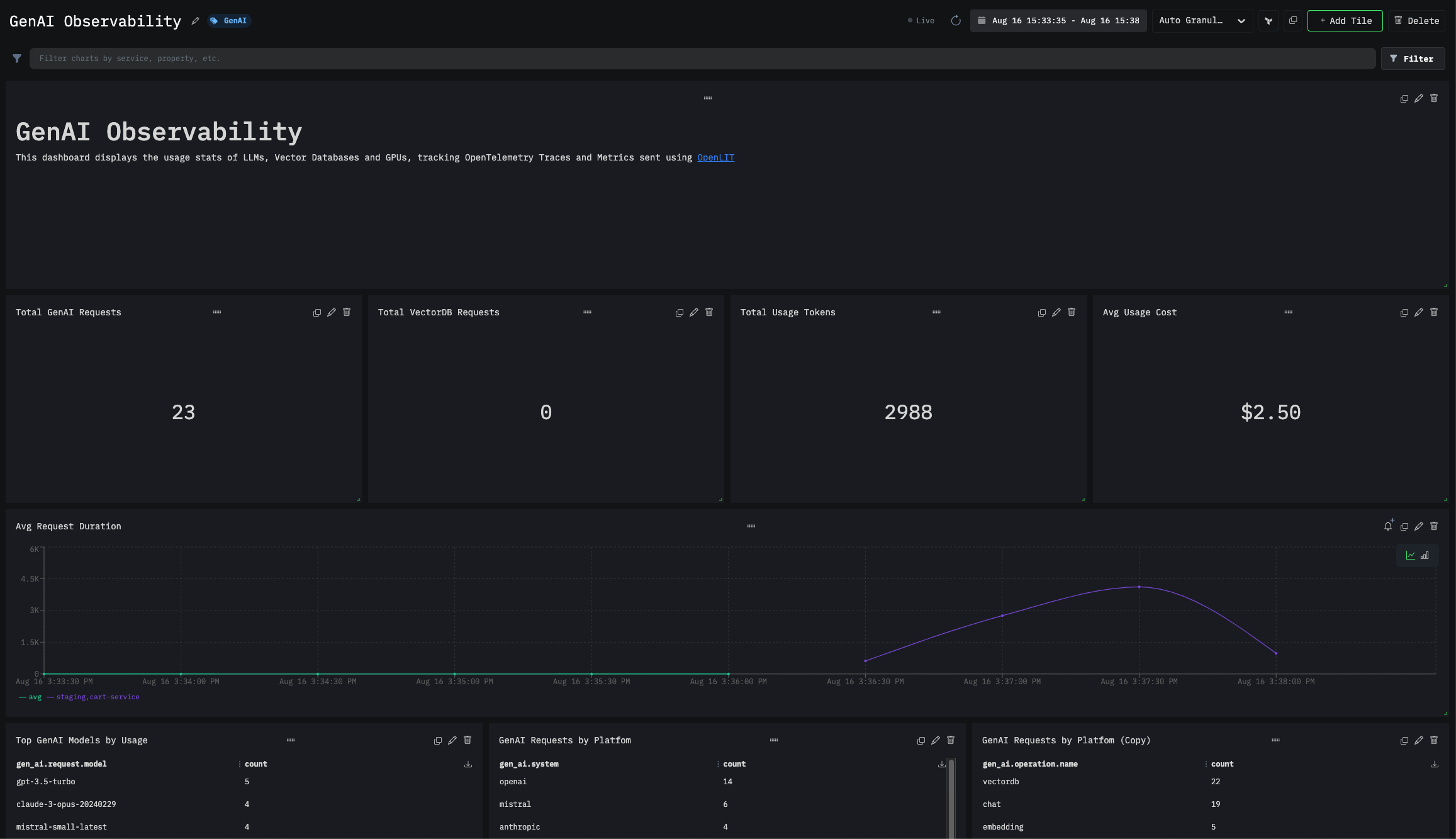
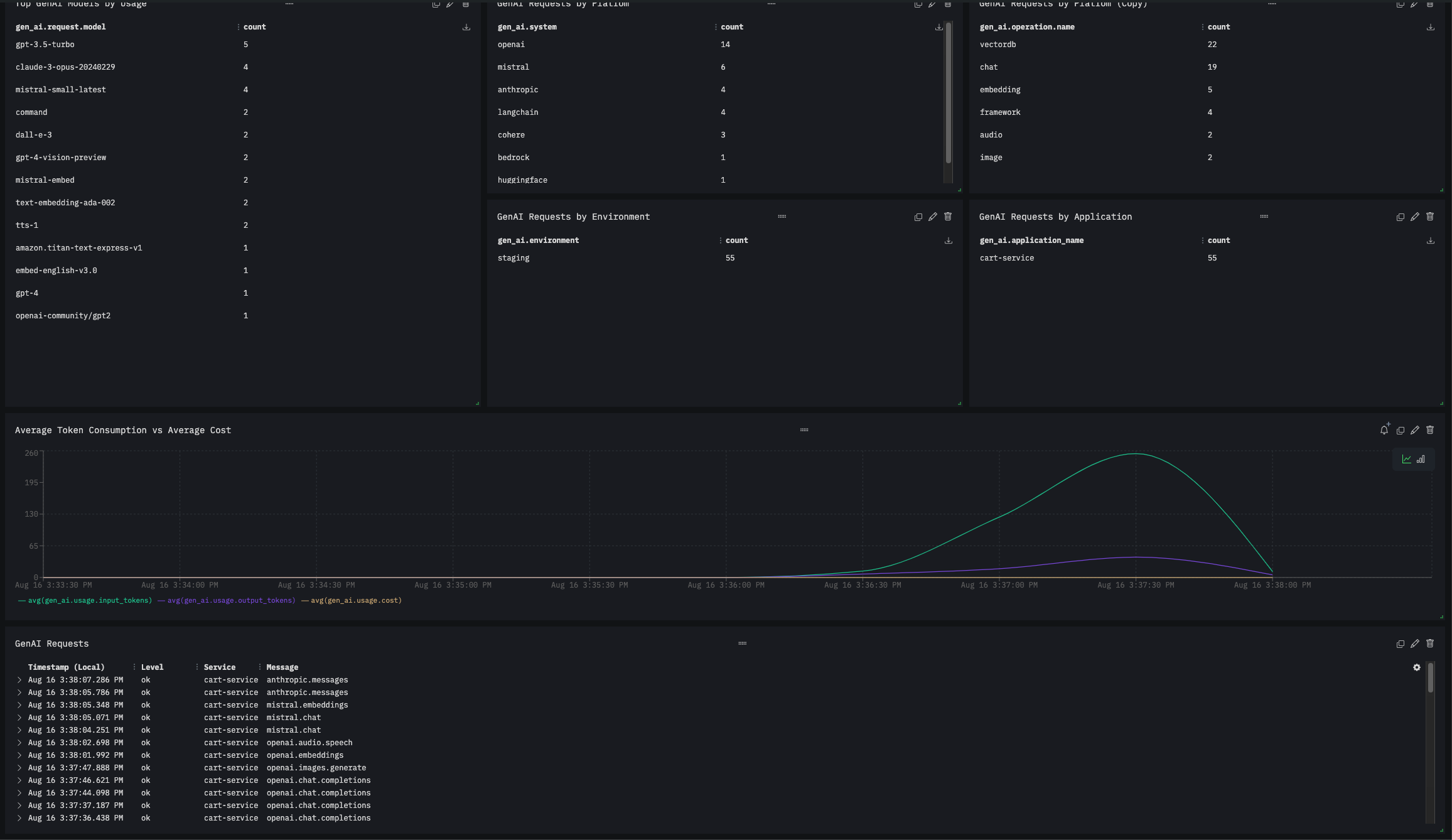
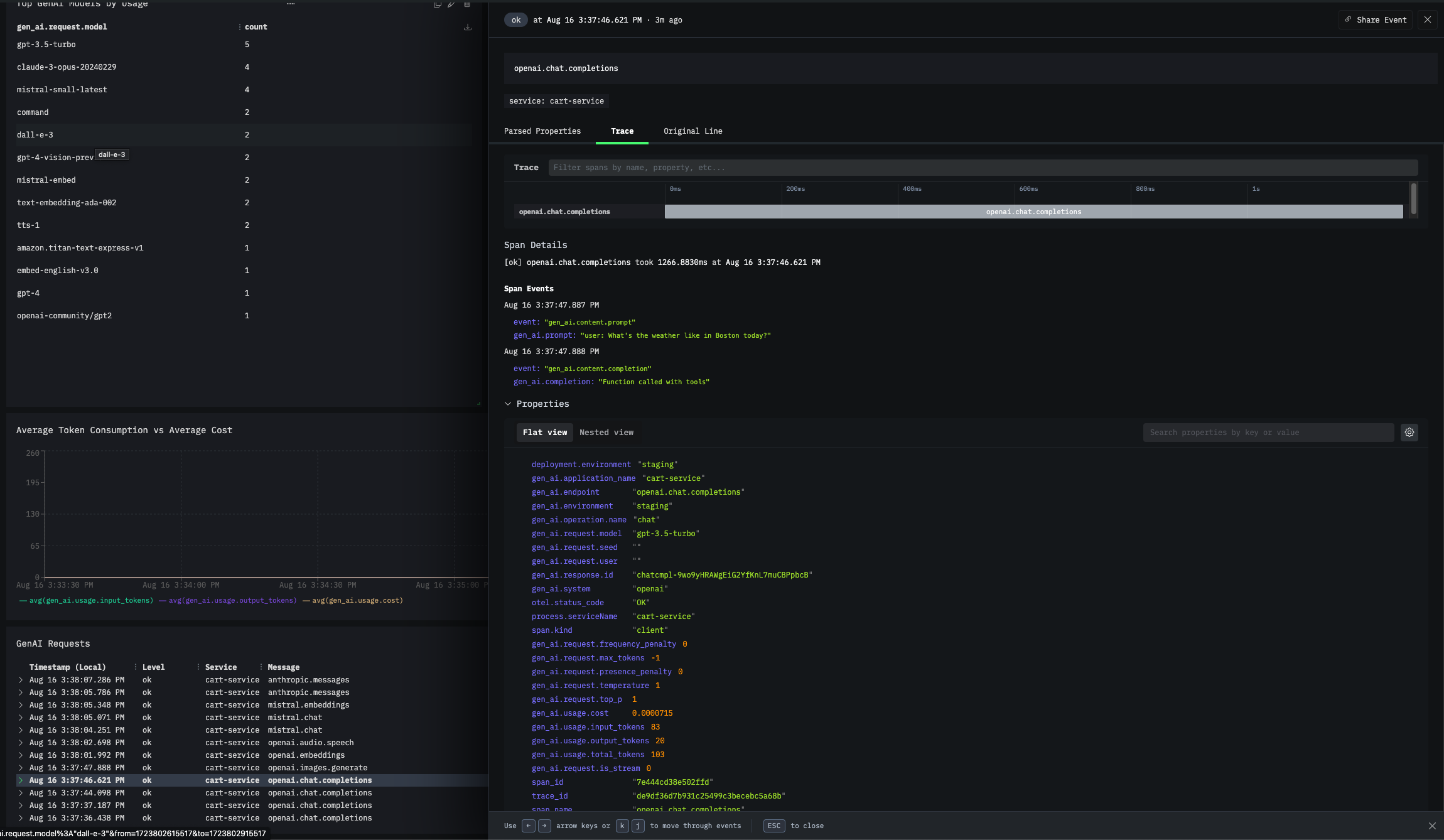 To send OpenTelemetry metrics and traces generated by OpenLIT from your AI Application to HyperDX, follow the below steps.
### 1. Get your Credentials
1. **Sign in to your HyperDX account**
2. **Get your API Key**:
* Navigate to your HyperDX settings or API keys section
* Generate or copy your existing API key
* Example format: `x6xx7265-43x3-476x-1112-x9x52x29xxxx`
### 2. Configure OpenTelemetry Collector
HyperDX requires an OpenTelemetry Collector as an intermediary to receive and forward telemetry data.
**Install OpenTelemetry Collector (if not already running)**
For detailed installation instructions, refer to the [OpenTelemetry Collector Documentation](https://opentelemetry.io/docs/collector/installation/).
**Configure the Collector**
1. **Configure HTTP Receiver**: In the `receivers` section, ensure the `otlp` receiver is set with `endpoint: 0.0.0.0:4318`.
2. **Define HyperDX Exporter**: Add `otlphttp/hdx` exporter to send data to HyperDX.
3. **Assign to Pipelines**: Link the exporter to traces and metrics pipelines.
```yaml theme={null}
receivers:
otlp:
protocols:
grpc:
endpoint: 0.0.0.0:4317
http:
endpoint: 0.0.0.0:4318
processors:
batch:
memory_limiter:
# 80% of maximum memory up to 2G
limit_mib: 1500
# 25% of limit up to 2G
spike_limit_mib: 512
check_interval: 5s
exporters:
otlphttp/hdx:
endpoint: 'https://in-otel.hyperdx.io'
headers:
authorization: YOUR_HYPERDX_API_KEY_HERE
compression: gzip
service:
pipelines:
traces:
receivers: [ otlp ]
processors: [ memory_limiter, batch ]
exporters: [ otlphttp/hdx ]
metrics:
receivers: [ otlp ]
processors: [ memory_limiter, batch ]
exporters: [ otlphttp/hdx ]
```
Replace `YOUR_HYPERDX_API_KEY_HERE` with your actual HyperDX API Key.
### 3. Instrument your application
**For direct integration into your Python applications:**
```python theme={null}
import openlit
openlit.init(
otlp_endpoint="YOUR_OTELCOL_URL:4318"
)
```
Replace:
1. `YOUR_OTELCOL_URL:4318` with the URL HTTP endpoint of your OpenTelemetry Collector.
* Example: `http://127.0.0.1:4318` (for local collector)
* Example: `http://otel-collector.default.svc.cluster.local:4318` (for Kubernetes)
```python theme={null}
import openlit
openlit.init()
```
Set these environment variables:
```shell theme={null}
export OTEL_EXPORTER_OTLP_ENDPOINT="YOUR_OTELCOL_URL:4318"
```
Replace:
1. `YOUR_OTELCOL_URL:4318` with the URL HTTP endpoint of your OpenTelemetry Collector.
* Example: `http://127.0.0.1:4318` (for local collector)
* Example: `http://otel-collector.default.svc.cluster.local:4318` (for Kubernetes)
Refer to the OpenLIT [Python SDK repository](https://github.com/openlit/openlit/tree/main/sdk/python) for more advanced configurations and use cases.
**For zero-code auto-instrumentation via command line:**
```shell theme={null}
# Using CLI arguments
openlit-instrument \
--otlp-endpoint "YOUR_OTELCOL_URL:4318" \
--service-name "my-ai-service" \
--deployment-environment "production" \
python app.py
```
Replace:
1. `YOUR_OTELCOL_URL:4318` with the URL HTTP endpoint of your OpenTelemetry Collector.
* Example: `http://127.0.0.1:4318` (for local collector)
* Example: `http://otel-collector.default.svc.cluster.local:4318` (for Kubernetes)
```shell theme={null}
# Set environment variables (takes precedence over CLI args)
export OTEL_EXPORTER_OTLP_ENDPOINT="YOUR_OTELCOL_URL:4318"
export OTEL_SERVICE_NAME="my-ai-service"
export OTEL_DEPLOYMENT_ENVIRONMENT="production"
# Run your application
openlit-instrument python app.py
```
Replace:
1. `YOUR_OTELCOL_URL:4318` with the URL HTTP endpoint of your OpenTelemetry Collector.
* Example: `http://127.0.0.1:4318` (for local collector)
* Example: `http://otel-collector.default.svc.cluster.local:4318` (for Kubernetes)
Refer to the OpenLIT [Python SDK repository](https://github.com/openlit/openlit/tree/main/sdk/python) for more advanced configurations and use cases.
### 4. Import the pre-built Dashboard
You can directly import a pre-built GenAI Observability dashboard using this URL:
[**Import HyperDX Dashboard**](https://www.hyperdx.io/dashboards?config=%7B%22_id%22%3A%2266bf2320c40e3a520add6e03%22%2C%22name%22%3A%22GenAI%20Observability%22%2C%22query%22%3A%22%22%2C%22charts%22%3A%5B%7B%22id%22%3A%22bsprr%22%2C%22name%22%3A%22Total%20GenAI%20Requests%22%2C%22x%22%3A0%2C%22y%22%3A2%2C%22w%22%3A3%2C%22h%22%3A2%2C%22series%22%3A%5B%7B%22table%22%3A%22metrics%22%2C%22type%22%3A%22number%22%2C%22aggFn%22%3A%22sum_rate%22%2C%22field%22%3A%22gen_ai.total.requests%20-%20Sum%22%2C%22where%22%3A%22telemetry.sdk.name%3A%5C%22openlit%5C%22%22%2C%22groupBy%22%3A%5B%5D%7D%5D%2C%22seriesReturnType%22%3A%22column%22%7D%2C%7B%22id%22%3A%22f2pi2%22%2C%22name%22%3A%22Total%20VectorDB%20Requests%22%2C%22x%22%3A3%2C%22y%22%3A2%2C%22w%22%3A3%2C%22h%22%3A2%2C%22series%22%3A%5B%7B%22table%22%3A%22metrics%22%2C%22type%22%3A%22number%22%2C%22aggFn%22%3A%22sum_rate%22%2C%22field%22%3A%22db.total.requests%20-%20Sum%22%2C%22where%22%3A%22telemetry.sdk.name%3A%5C%22openlit%5C%22%22%2C%22groupBy%22%3A%5B%5D%7D%5D%2C%22seriesReturnType%22%3A%22column%22%7D%2C%7B%22id%22%3A%22owhmy%22%2C%22name%22%3A%22Avg%20Usage%20Cost%22%2C%22x%22%3A9%2C%22y%22%3A2%2C%22w%22%3A3%2C%22h%22%3A2%2C%22series%22%3A%5B%7B%22table%22%3A%22metrics%22%2C%22type%22%3A%22number%22%2C%22aggFn%22%3A%22p50%22%2C%22field%22%3A%22gen_ai.usage.cost_bucket%20-%20Histogram%22%2C%22where%22%3A%22telemetry.sdk.name%3A%5C%22openlit%5C%22%22%2C%22groupBy%22%3A%5B%5D%2C%22numberFormat%22%3A%7B%22factor%22%3A1%2C%22output%22%3A%22currency%22%2C%22mantissa%22%3A2%2C%22thousandSeparated%22%3Atrue%2C%22average%22%3Afalse%2C%22decimalBytes%22%3Afalse%2C%22currencySymbol%22%3A%22%22%7D%2C%22color%22%3A%22%23b3d4ff%22%7D%5D%2C%22seriesReturnType%22%3A%22column%22%7D%2C%7B%22id%22%3A%22670j%22%2C%22name%22%3A%22Total%20Usage%20Tokens%22%2C%22x%22%3A6%2C%22y%22%3A2%2C%22w%22%3A3%2C%22h%22%3A2%2C%22series%22%3A%5B%7B%22table%22%3A%22metrics%22%2C%22type%22%3A%22number%22%2C%22aggFn%22%3A%22sum_rate%22%2C%22field%22%3A%22gen_ai.usage.total_tokens%20-%20Sum%22%2C%22where%22%3A%22telemetry.sdk.name%3A%5C%22openlit%5C%22%22%2C%22groupBy%22%3A%5B%5D%2C%22color%22%3A%22%230bb4ff%22%7D%5D%2C%22seriesReturnType%22%3A%22column%22%7D%2C%7B%22id%22%3A%221dja8w%22%2C%22name%22%3A%22Avg%20Request%20Duration%22%2C%22x%22%3A0%2C%22y%22%3A4%2C%22w%22%3A12%2C%22h%22%3A2%2C%22series%22%3A%5B%7B%22table%22%3A%22logs%22%2C%22type%22%3A%22time%22%2C%22aggFn%22%3A%22avg%22%2C%22field%22%3A%22duration%22%2C%22where%22%3A%22%22%2C%22groupBy%22%3A%5B%22gen_ai.environment%22%2C%22gen_ai.application_name%22%5D%7D%5D%2C%22seriesReturnType%22%3A%22column%22%7D%2C%7B%22id%22%3A%221ch83z%22%2C%22name%22%3A%22Top%20GenAI%20Models%20by%20Usage%22%2C%22x%22%3A0%2C%22y%22%3A6%2C%22w%22%3A4%2C%22h%22%3A4%2C%22series%22%3A%5B%7B%22table%22%3A%22logs%22%2C%22type%22%3A%22table%22%2C%22aggFn%22%3A%22count%22%2C%22where%22%3A%22%22%2C%22groupBy%22%3A%5B%22gen_ai.request.model%22%5D%2C%22color%22%3A%22%230bb4ff%22%7D%5D%2C%22seriesReturnType%22%3A%22column%22%7D%2C%7B%22id%22%3A%221jcxpe%22%2C%22name%22%3A%22GenAI%20Requests%20by%20Platfom%22%2C%22x%22%3A4%2C%22y%22%3A6%2C%22w%22%3A4%2C%22h%22%3A2%2C%22series%22%3A%5B%7B%22table%22%3A%22logs%22%2C%22type%22%3A%22table%22%2C%22aggFn%22%3A%22count%22%2C%22where%22%3A%22%22%2C%22groupBy%22%3A%5B%22gen_ai.system%22%5D%7D%5D%2C%22seriesReturnType%22%3A%22column%22%7D%2C%7B%22id%22%3A%22r6xow%22%2C%22name%22%3A%22GenAI%20Requests%20by%20System%22%2C%22x%22%3A8%2C%22y%22%3A6%2C%22w%22%3A4%2C%22h%22%3A2%2C%22series%22%3A%5B%7B%22table%22%3A%22logs%22%2C%22type%22%3A%22table%22%2C%22aggFn%22%3A%22count%22%2C%22where%22%3A%22%22%2C%22groupBy%22%3A%5B%22gen_ai.operation.name%22%5D%7D%5D%2C%22seriesReturnType%22%3A%22column%22%7D%2C%7B%22id%22%3A%226rdog%22%2C%22name%22%3A%22GenAI%20Requests%20by%20Environment%22%2C%22x%22%3A4%2C%22y%22%3A8%2C%22w%22%3A4%2C%22h%22%3A2%2C%22series%22%3A%5B%7B%22table%22%3A%22logs%22%2C%22type%22%3A%22table%22%2C%22aggFn%22%3A%22count%22%2C%22where%22%3A%22%22%2C%22groupBy%22%3A%5B%22gen_ai.environment%22%5D%7D%5D%2C%22seriesReturnType%22%3A%22column%22%7D%2C%7B%22id%22%3A%22gln0a%22%2C%22name%22%3A%22GenAI%20Requests%20by%20Application%22%2C%22x%22%3A8%2C%22y%22%3A8%2C%22w%22%3A4%2C%22h%22%3A2%2C%22series%22%3A%5B%7B%22table%22%3A%22logs%22%2C%22type%22%3A%22table%22%2C%22aggFn%22%3A%22count%22%2C%22where%22%3A%22%22%2C%22groupBy%22%3A%5B%22gen_ai.application_name%22%5D%7D%5D%2C%22seriesReturnType%22%3A%22column%22%7D%2C%7B%22id%22%3A%2214bopp%22%2C%22name%22%3A%22Average%20Token%20Consumption%20vs%20Average%20Cost%20%22%2C%22x%22%3A0%2C%22y%22%3A10%2C%22w%22%3A12%2C%22h%22%3A2%2C%22series%22%3A%5B%7B%22table%22%3A%22logs%22%2C%22type%22%3A%22time%22%2C%22aggFn%22%3A%22avg%22%2C%22field%22%3A%22gen_ai.usage.input_tokens%22%2C%22where%22%3A%22telemetry.sdk.name%3Aopenlit%22%2C%22groupBy%22%3A%5B%5D%7D%2C%7B%22table%22%3A%22logs%22%2C%22type%22%3A%22time%22%2C%22aggFn%22%3A%22avg%22%2C%22field%22%3A%22gen_ai.usage.output_tokens%22%2C%22where%22%3A%22telemetry.sdk.name%3Aopenlit%22%2C%22groupBy%22%3A%5B%5D%7D%2C%7B%22table%22%3A%22logs%22%2C%22type%22%3A%22time%22%2C%22aggFn%22%3A%22avg%22%2C%22field%22%3A%22gen_ai.usage.cost%22%2C%22where%22%3A%22telemetry.sdk.name%3Aopenlit%22%2C%22groupBy%22%3A%5B%5D%7D%5D%2C%22seriesReturnType%22%3A%22column%22%7D%2C%7B%22id%22%3A%221jqc2e%22%2C%22name%22%3A%22GenAI%20Requests%22%2C%22x%22%3A0%2C%22y%22%3A12%2C%22w%22%3A12%2C%22h%22%3A2%2C%22series%22%3A%5B%7B%22table%22%3A%22logs%22%2C%22type%22%3A%22search%22%2C%22aggFn%22%3A%22count%22%2C%22where%22%3A%22telemetry.sdk.name%3Aopenlit%22%2C%22groupBy%22%3A%5B%5D%7D%5D%2C%22seriesReturnType%22%3A%22column%22%7D%2C%7B%22id%22%3A%22l2psc%22%2C%22name%22%3A%22%22%2C%22x%22%3A0%2C%22y%22%3A0%2C%22w%22%3A12%2C%22h%22%3A2%2C%22series%22%3A%5B%7B%22table%22%3A%22logs%22%2C%22type%22%3A%22markdown%22%2C%22aggFn%22%3A%22count%22%2C%22where%22%3A%22%22%2C%22groupBy%22%3A%5B%5D%2C%22content%22%3A%22%23%20GenAI%20Observability%5CnThis%20dashboard%20displays%20the%20usage%20stats%20of%20LLMs%2C%20Vector%20Databases%20and%20GPUs%2C%20tracking%20OpenTelemetry%20Traces%20and%20Metrics%20sent%20using%20%5BOpenLIT%5D\(https%3A%2F%2Fgithub.com%2Fopenlit%2Fopenlit\)%22%7D%5D%2C%22seriesReturnType%22%3A%22column%22%7D%5D%2C%22tags%22%3A%5B%22GenAI%22%5D%2C%22id%22%3A%22%22%7D)
This is an unsaved dashboard URL. When you click on it, the dashboard will open in your own HyperDX instance. You can then choose to save it, and it will be added to your HyperDX instance.
To send OpenTelemetry metrics and traces generated by OpenLIT from your AI Application to HyperDX, follow the below steps.
### 1. Get your Credentials
1. **Sign in to your HyperDX account**
2. **Get your API Key**:
* Navigate to your HyperDX settings or API keys section
* Generate or copy your existing API key
* Example format: `x6xx7265-43x3-476x-1112-x9x52x29xxxx`
### 2. Configure OpenTelemetry Collector
HyperDX requires an OpenTelemetry Collector as an intermediary to receive and forward telemetry data.
**Install OpenTelemetry Collector (if not already running)**
For detailed installation instructions, refer to the [OpenTelemetry Collector Documentation](https://opentelemetry.io/docs/collector/installation/).
**Configure the Collector**
1. **Configure HTTP Receiver**: In the `receivers` section, ensure the `otlp` receiver is set with `endpoint: 0.0.0.0:4318`.
2. **Define HyperDX Exporter**: Add `otlphttp/hdx` exporter to send data to HyperDX.
3. **Assign to Pipelines**: Link the exporter to traces and metrics pipelines.
```yaml theme={null}
receivers:
otlp:
protocols:
grpc:
endpoint: 0.0.0.0:4317
http:
endpoint: 0.0.0.0:4318
processors:
batch:
memory_limiter:
# 80% of maximum memory up to 2G
limit_mib: 1500
# 25% of limit up to 2G
spike_limit_mib: 512
check_interval: 5s
exporters:
otlphttp/hdx:
endpoint: 'https://in-otel.hyperdx.io'
headers:
authorization: YOUR_HYPERDX_API_KEY_HERE
compression: gzip
service:
pipelines:
traces:
receivers: [ otlp ]
processors: [ memory_limiter, batch ]
exporters: [ otlphttp/hdx ]
metrics:
receivers: [ otlp ]
processors: [ memory_limiter, batch ]
exporters: [ otlphttp/hdx ]
```
Replace `YOUR_HYPERDX_API_KEY_HERE` with your actual HyperDX API Key.
### 3. Instrument your application
**For direct integration into your Python applications:**
```python theme={null}
import openlit
openlit.init(
otlp_endpoint="YOUR_OTELCOL_URL:4318"
)
```
Replace:
1. `YOUR_OTELCOL_URL:4318` with the URL HTTP endpoint of your OpenTelemetry Collector.
* Example: `http://127.0.0.1:4318` (for local collector)
* Example: `http://otel-collector.default.svc.cluster.local:4318` (for Kubernetes)
```python theme={null}
import openlit
openlit.init()
```
Set these environment variables:
```shell theme={null}
export OTEL_EXPORTER_OTLP_ENDPOINT="YOUR_OTELCOL_URL:4318"
```
Replace:
1. `YOUR_OTELCOL_URL:4318` with the URL HTTP endpoint of your OpenTelemetry Collector.
* Example: `http://127.0.0.1:4318` (for local collector)
* Example: `http://otel-collector.default.svc.cluster.local:4318` (for Kubernetes)
Refer to the OpenLIT [Python SDK repository](https://github.com/openlit/openlit/tree/main/sdk/python) for more advanced configurations and use cases.
**For zero-code auto-instrumentation via command line:**
```shell theme={null}
# Using CLI arguments
openlit-instrument \
--otlp-endpoint "YOUR_OTELCOL_URL:4318" \
--service-name "my-ai-service" \
--deployment-environment "production" \
python app.py
```
Replace:
1. `YOUR_OTELCOL_URL:4318` with the URL HTTP endpoint of your OpenTelemetry Collector.
* Example: `http://127.0.0.1:4318` (for local collector)
* Example: `http://otel-collector.default.svc.cluster.local:4318` (for Kubernetes)
```shell theme={null}
# Set environment variables (takes precedence over CLI args)
export OTEL_EXPORTER_OTLP_ENDPOINT="YOUR_OTELCOL_URL:4318"
export OTEL_SERVICE_NAME="my-ai-service"
export OTEL_DEPLOYMENT_ENVIRONMENT="production"
# Run your application
openlit-instrument python app.py
```
Replace:
1. `YOUR_OTELCOL_URL:4318` with the URL HTTP endpoint of your OpenTelemetry Collector.
* Example: `http://127.0.0.1:4318` (for local collector)
* Example: `http://otel-collector.default.svc.cluster.local:4318` (for Kubernetes)
Refer to the OpenLIT [Python SDK repository](https://github.com/openlit/openlit/tree/main/sdk/python) for more advanced configurations and use cases.
### 4. Import the pre-built Dashboard
You can directly import a pre-built GenAI Observability dashboard using this URL:
[**Import HyperDX Dashboard**](https://www.hyperdx.io/dashboards?config=%7B%22_id%22%3A%2266bf2320c40e3a520add6e03%22%2C%22name%22%3A%22GenAI%20Observability%22%2C%22query%22%3A%22%22%2C%22charts%22%3A%5B%7B%22id%22%3A%22bsprr%22%2C%22name%22%3A%22Total%20GenAI%20Requests%22%2C%22x%22%3A0%2C%22y%22%3A2%2C%22w%22%3A3%2C%22h%22%3A2%2C%22series%22%3A%5B%7B%22table%22%3A%22metrics%22%2C%22type%22%3A%22number%22%2C%22aggFn%22%3A%22sum_rate%22%2C%22field%22%3A%22gen_ai.total.requests%20-%20Sum%22%2C%22where%22%3A%22telemetry.sdk.name%3A%5C%22openlit%5C%22%22%2C%22groupBy%22%3A%5B%5D%7D%5D%2C%22seriesReturnType%22%3A%22column%22%7D%2C%7B%22id%22%3A%22f2pi2%22%2C%22name%22%3A%22Total%20VectorDB%20Requests%22%2C%22x%22%3A3%2C%22y%22%3A2%2C%22w%22%3A3%2C%22h%22%3A2%2C%22series%22%3A%5B%7B%22table%22%3A%22metrics%22%2C%22type%22%3A%22number%22%2C%22aggFn%22%3A%22sum_rate%22%2C%22field%22%3A%22db.total.requests%20-%20Sum%22%2C%22where%22%3A%22telemetry.sdk.name%3A%5C%22openlit%5C%22%22%2C%22groupBy%22%3A%5B%5D%7D%5D%2C%22seriesReturnType%22%3A%22column%22%7D%2C%7B%22id%22%3A%22owhmy%22%2C%22name%22%3A%22Avg%20Usage%20Cost%22%2C%22x%22%3A9%2C%22y%22%3A2%2C%22w%22%3A3%2C%22h%22%3A2%2C%22series%22%3A%5B%7B%22table%22%3A%22metrics%22%2C%22type%22%3A%22number%22%2C%22aggFn%22%3A%22p50%22%2C%22field%22%3A%22gen_ai.usage.cost_bucket%20-%20Histogram%22%2C%22where%22%3A%22telemetry.sdk.name%3A%5C%22openlit%5C%22%22%2C%22groupBy%22%3A%5B%5D%2C%22numberFormat%22%3A%7B%22factor%22%3A1%2C%22output%22%3A%22currency%22%2C%22mantissa%22%3A2%2C%22thousandSeparated%22%3Atrue%2C%22average%22%3Afalse%2C%22decimalBytes%22%3Afalse%2C%22currencySymbol%22%3A%22%22%7D%2C%22color%22%3A%22%23b3d4ff%22%7D%5D%2C%22seriesReturnType%22%3A%22column%22%7D%2C%7B%22id%22%3A%22670j%22%2C%22name%22%3A%22Total%20Usage%20Tokens%22%2C%22x%22%3A6%2C%22y%22%3A2%2C%22w%22%3A3%2C%22h%22%3A2%2C%22series%22%3A%5B%7B%22table%22%3A%22metrics%22%2C%22type%22%3A%22number%22%2C%22aggFn%22%3A%22sum_rate%22%2C%22field%22%3A%22gen_ai.usage.total_tokens%20-%20Sum%22%2C%22where%22%3A%22telemetry.sdk.name%3A%5C%22openlit%5C%22%22%2C%22groupBy%22%3A%5B%5D%2C%22color%22%3A%22%230bb4ff%22%7D%5D%2C%22seriesReturnType%22%3A%22column%22%7D%2C%7B%22id%22%3A%221dja8w%22%2C%22name%22%3A%22Avg%20Request%20Duration%22%2C%22x%22%3A0%2C%22y%22%3A4%2C%22w%22%3A12%2C%22h%22%3A2%2C%22series%22%3A%5B%7B%22table%22%3A%22logs%22%2C%22type%22%3A%22time%22%2C%22aggFn%22%3A%22avg%22%2C%22field%22%3A%22duration%22%2C%22where%22%3A%22%22%2C%22groupBy%22%3A%5B%22gen_ai.environment%22%2C%22gen_ai.application_name%22%5D%7D%5D%2C%22seriesReturnType%22%3A%22column%22%7D%2C%7B%22id%22%3A%221ch83z%22%2C%22name%22%3A%22Top%20GenAI%20Models%20by%20Usage%22%2C%22x%22%3A0%2C%22y%22%3A6%2C%22w%22%3A4%2C%22h%22%3A4%2C%22series%22%3A%5B%7B%22table%22%3A%22logs%22%2C%22type%22%3A%22table%22%2C%22aggFn%22%3A%22count%22%2C%22where%22%3A%22%22%2C%22groupBy%22%3A%5B%22gen_ai.request.model%22%5D%2C%22color%22%3A%22%230bb4ff%22%7D%5D%2C%22seriesReturnType%22%3A%22column%22%7D%2C%7B%22id%22%3A%221jcxpe%22%2C%22name%22%3A%22GenAI%20Requests%20by%20Platfom%22%2C%22x%22%3A4%2C%22y%22%3A6%2C%22w%22%3A4%2C%22h%22%3A2%2C%22series%22%3A%5B%7B%22table%22%3A%22logs%22%2C%22type%22%3A%22table%22%2C%22aggFn%22%3A%22count%22%2C%22where%22%3A%22%22%2C%22groupBy%22%3A%5B%22gen_ai.system%22%5D%7D%5D%2C%22seriesReturnType%22%3A%22column%22%7D%2C%7B%22id%22%3A%22r6xow%22%2C%22name%22%3A%22GenAI%20Requests%20by%20System%22%2C%22x%22%3A8%2C%22y%22%3A6%2C%22w%22%3A4%2C%22h%22%3A2%2C%22series%22%3A%5B%7B%22table%22%3A%22logs%22%2C%22type%22%3A%22table%22%2C%22aggFn%22%3A%22count%22%2C%22where%22%3A%22%22%2C%22groupBy%22%3A%5B%22gen_ai.operation.name%22%5D%7D%5D%2C%22seriesReturnType%22%3A%22column%22%7D%2C%7B%22id%22%3A%226rdog%22%2C%22name%22%3A%22GenAI%20Requests%20by%20Environment%22%2C%22x%22%3A4%2C%22y%22%3A8%2C%22w%22%3A4%2C%22h%22%3A2%2C%22series%22%3A%5B%7B%22table%22%3A%22logs%22%2C%22type%22%3A%22table%22%2C%22aggFn%22%3A%22count%22%2C%22where%22%3A%22%22%2C%22groupBy%22%3A%5B%22gen_ai.environment%22%5D%7D%5D%2C%22seriesReturnType%22%3A%22column%22%7D%2C%7B%22id%22%3A%22gln0a%22%2C%22name%22%3A%22GenAI%20Requests%20by%20Application%22%2C%22x%22%3A8%2C%22y%22%3A8%2C%22w%22%3A4%2C%22h%22%3A2%2C%22series%22%3A%5B%7B%22table%22%3A%22logs%22%2C%22type%22%3A%22table%22%2C%22aggFn%22%3A%22count%22%2C%22where%22%3A%22%22%2C%22groupBy%22%3A%5B%22gen_ai.application_name%22%5D%7D%5D%2C%22seriesReturnType%22%3A%22column%22%7D%2C%7B%22id%22%3A%2214bopp%22%2C%22name%22%3A%22Average%20Token%20Consumption%20vs%20Average%20Cost%20%22%2C%22x%22%3A0%2C%22y%22%3A10%2C%22w%22%3A12%2C%22h%22%3A2%2C%22series%22%3A%5B%7B%22table%22%3A%22logs%22%2C%22type%22%3A%22time%22%2C%22aggFn%22%3A%22avg%22%2C%22field%22%3A%22gen_ai.usage.input_tokens%22%2C%22where%22%3A%22telemetry.sdk.name%3Aopenlit%22%2C%22groupBy%22%3A%5B%5D%7D%2C%7B%22table%22%3A%22logs%22%2C%22type%22%3A%22time%22%2C%22aggFn%22%3A%22avg%22%2C%22field%22%3A%22gen_ai.usage.output_tokens%22%2C%22where%22%3A%22telemetry.sdk.name%3Aopenlit%22%2C%22groupBy%22%3A%5B%5D%7D%2C%7B%22table%22%3A%22logs%22%2C%22type%22%3A%22time%22%2C%22aggFn%22%3A%22avg%22%2C%22field%22%3A%22gen_ai.usage.cost%22%2C%22where%22%3A%22telemetry.sdk.name%3Aopenlit%22%2C%22groupBy%22%3A%5B%5D%7D%5D%2C%22seriesReturnType%22%3A%22column%22%7D%2C%7B%22id%22%3A%221jqc2e%22%2C%22name%22%3A%22GenAI%20Requests%22%2C%22x%22%3A0%2C%22y%22%3A12%2C%22w%22%3A12%2C%22h%22%3A2%2C%22series%22%3A%5B%7B%22table%22%3A%22logs%22%2C%22type%22%3A%22search%22%2C%22aggFn%22%3A%22count%22%2C%22where%22%3A%22telemetry.sdk.name%3Aopenlit%22%2C%22groupBy%22%3A%5B%5D%7D%5D%2C%22seriesReturnType%22%3A%22column%22%7D%2C%7B%22id%22%3A%22l2psc%22%2C%22name%22%3A%22%22%2C%22x%22%3A0%2C%22y%22%3A0%2C%22w%22%3A12%2C%22h%22%3A2%2C%22series%22%3A%5B%7B%22table%22%3A%22logs%22%2C%22type%22%3A%22markdown%22%2C%22aggFn%22%3A%22count%22%2C%22where%22%3A%22%22%2C%22groupBy%22%3A%5B%5D%2C%22content%22%3A%22%23%20GenAI%20Observability%5CnThis%20dashboard%20displays%20the%20usage%20stats%20of%20LLMs%2C%20Vector%20Databases%20and%20GPUs%2C%20tracking%20OpenTelemetry%20Traces%20and%20Metrics%20sent%20using%20%5BOpenLIT%5D\(https%3A%2F%2Fgithub.com%2Fopenlit%2Fopenlit\)%22%7D%5D%2C%22seriesReturnType%22%3A%22column%22%7D%5D%2C%22tags%22%3A%5B%22GenAI%22%5D%2C%22id%22%3A%22%22%7D)
This is an unsaved dashboard URL. When you click on it, the dashboard will open in your own HyperDX instance. You can then choose to save it, and it will be added to your HyperDX instance.