> ## Documentation Index
> Fetch the complete documentation index at: https://docs.openlit.io/llms.txt
> Use this file to discover all available pages before exploring further.
# Rule Engine
> Define conditional rules with AND/OR logic to match runtime inputs and retrieve linked AI resources
The Rule Engine lets you define flexible matching rules that evaluate incoming field values against conditions. When a rule matches, it returns references to linked entities — such as contexts, prompts, datasets, or meta configs — along with their full data if requested. This enables dynamic, condition-driven retrieval of AI resources at runtime.
## Key features
* **Condition groups**: Organise conditions into groups. Each group uses its own **AND/OR** logic, and groups are combined using a top-level **AND/OR** group operator.
* **Rich operators**: Supports `equals`, `not_equals`, `contains`, `not_contains`, `starts_with`, `ends_with`, `regex`, `in`, `not_in`, `gt`, `gte`, `lt`, `lte`, and `between` across `string`, `number`, and `boolean` data types.
* **Entity linking**: Associate a rule with one or more entities — **Context**, **Prompt**, **Dataset**, or **Meta Config** — so matching rules return the relevant resources.
* **Status control**: Enable or disable rules without deletion using **Active** / **Inactive** status.
* **External API**: Evaluate rules from any application using Bearer token authentication, without requiring a dashboard session.
## How it works
```
Input fields → Rule Engine → Matching rules → Linked entity data
{ model: "gpt-4", (evaluates all (context content,
user_tier: "premium" } ACTIVE rules) compiled prompt, ...)
```
The evaluate API receives a flat key-value map of input fields and an `entity_type` filter. It runs all active rules against those inputs and returns the IDs of matching rules plus their linked entities (optionally with full data).
## Get started
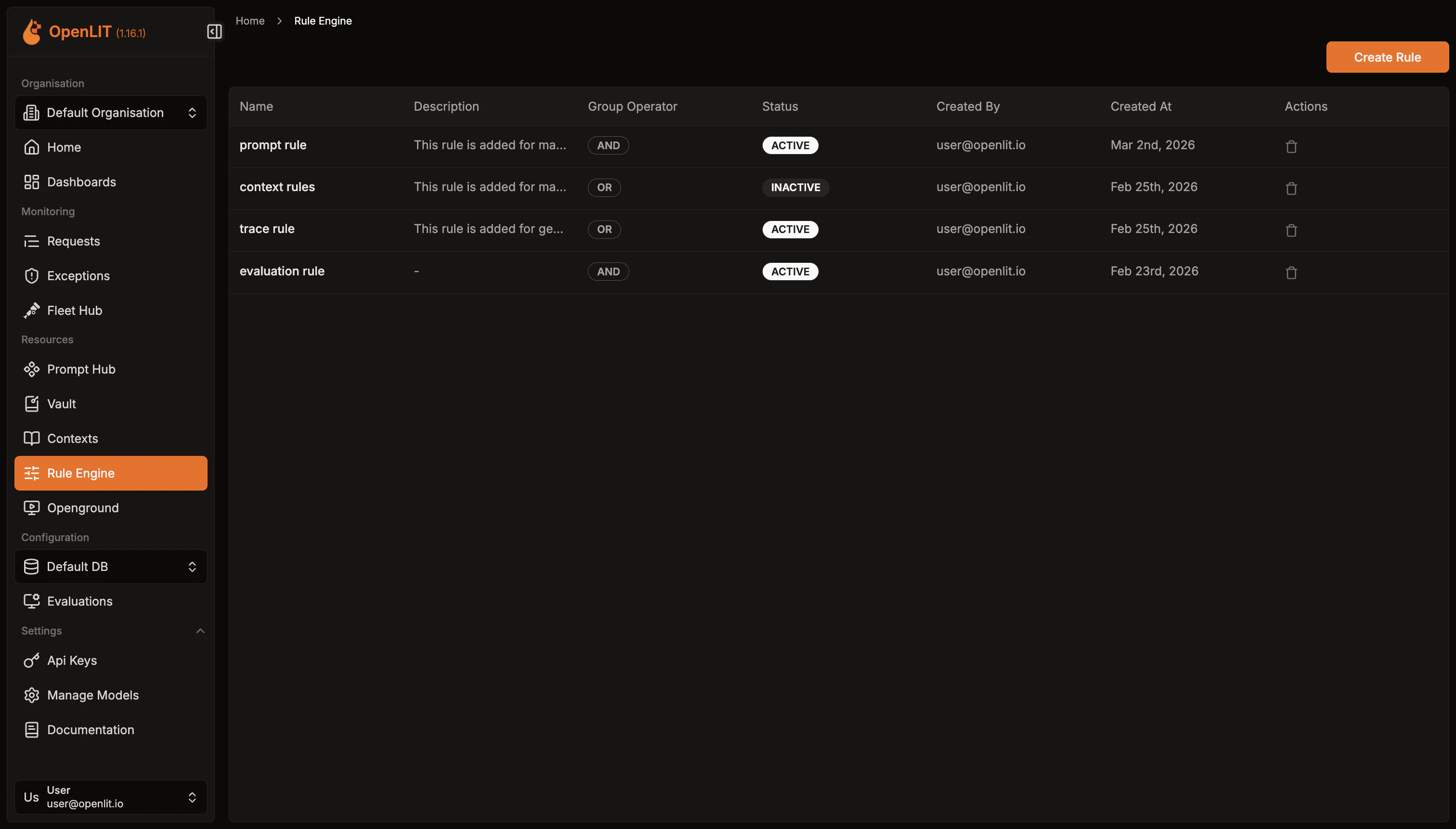 1. Navigate to **Rule Engine** in the OpenLIT sidebar.
2. Browse existing rules with their name, status, and group operator.
1. Click **Create Rule** in the top-right corner.
2. Enter a **Name** (required) and optional **Description**.
3. Choose the top-level **Group Operator** — **AND** means all condition groups must match; **OR** means any group must match.
4. Set **Status** to *Active* or *Inactive*.
5. Click **Create**.
After creating a rule, open its detail page to add conditions.
1. Navigate to **Rule Engine** in the OpenLIT sidebar.
2. Browse existing rules with their name, status, and group operator.
1. Click **Create Rule** in the top-right corner.
2. Enter a **Name** (required) and optional **Description**.
3. Choose the top-level **Group Operator** — **AND** means all condition groups must match; **OR** means any group must match.
4. Set **Status** to *Active* or *Inactive*.
5. Click **Create**.
After creating a rule, open its detail page to add conditions.
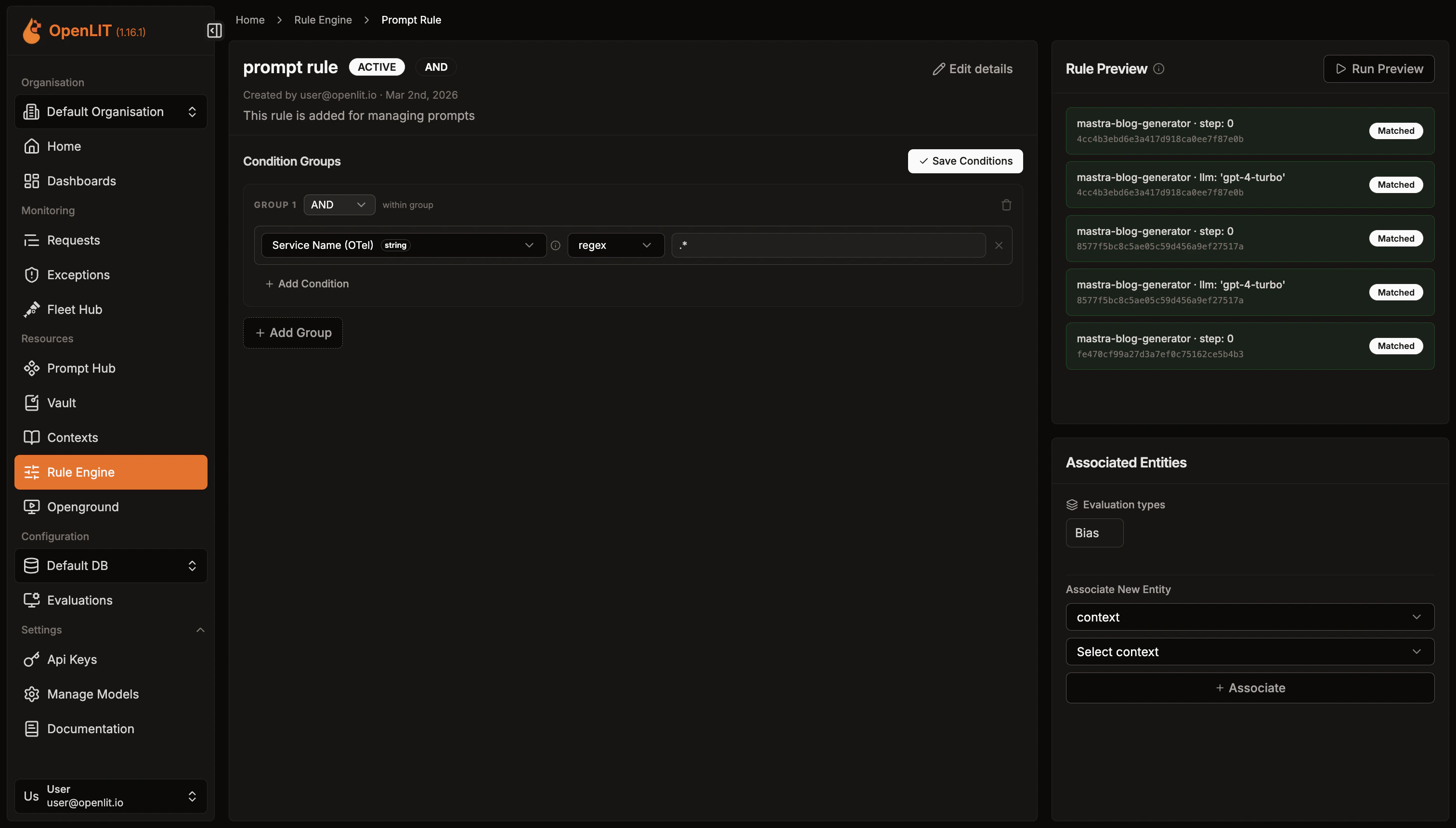 1. Click **Add Condition Group**.
2. Choose the group's **Condition Operator** (AND / OR).
3. Add one or more conditions:
* **Field**: The input key to match against (e.g. `model`, `user_tier`, `token_count`).
* **Operator**: One of the supported comparison operators.
* **Value**: The value to compare against.
* **Data Type**: `string`, `number`, or `boolean`.
4. Add more groups as needed. Save all changes with **Save Conditions**.
**Example**: Match requests where `model` equals `gpt-4` **AND** `token_count` is greater than `1000`:
```
Group 1 (AND):
field=model, operator=equals, value=gpt-4, data_type=string
field=token_count, operator=gt, value=1000, data_type=number
```
Rules become actionable when they reference resources to return.
1. On the rule detail page, scroll to the **Linked Entities** panel.
2. Select an **Entity Type** (Context, Prompt, Dataset, or Meta Config).
3. Enter the **Entity ID** or select from the dropdown.
4. Click **Add Entity**.
When the rule matches, all linked entities are returned in the evaluate response.
You can also link rules to contexts or prompts directly from their detail pages.
* Navigate to **Settings → API Keys** in OpenLIT.
* Click **Create API Key**, enter a name, and save the key securely.
Send a `POST` to `/api/rule-engine/evaluate` using curl or one of the OpenLIT SDKs.
**Required fields:**
* `entity_type` — Filter results to a specific entity type: `context`, `prompt`, `dataset`, or `meta_config`.
* `fields` — Key-value map of input values to evaluate against rule conditions.
**Optional fields:**
* `include_entity_data` — Set to `true` to fetch full entity records in the response.
* `entity_inputs` — Extra parameters specific to the entity type (e.g. `variables` and `shouldCompile` for `prompt`).
```python theme={null}
import openlit
# Retrieve contexts
result = openlit.evaluate_rule(
entity_type="context",
fields={"model": "gpt-4", "user_tier": "premium"},
include_entity_data=True,
)
# Retrieve compiled prompts
result = openlit.evaluate_rule(
entity_type="prompt",
fields={"model": "gpt-4", "user_tier": "premium"},
include_entity_data=True,
entity_inputs={
"variables": {"user_name": "Alice", "product": "OpenLIT"},
"shouldCompile": True,
},
)
```
```typescript theme={null}
import Openlit from 'openlit';
// Retrieve contexts
const result = await Openlit.evaluateRule({
entityType: 'context',
fields: { model: 'gpt-4', user_tier: 'premium' },
includeEntityData: true,
});
// Retrieve compiled prompts
const promptResult = await Openlit.evaluateRule({
entityType: 'prompt',
fields: { model: 'gpt-4', user_tier: 'premium' },
includeEntityData: true,
entityInputs: {
variables: { user_name: 'Alice', product: 'OpenLIT' },
shouldCompile: true,
},
});
```
```go theme={null}
// Retrieve contexts
result, err := openlit.EvaluateRule(ctx, openlit.EvaluateRuleOptions{
EntityType: openlit.RuleEntityContext,
Fields: map[string]interface{}{"model": "gpt-4", "user_tier": "premium"},
IncludeEntityData: true,
})
// Retrieve compiled prompts
result, err = openlit.EvaluateRule(ctx, openlit.EvaluateRuleOptions{
EntityType: openlit.RuleEntityPrompt,
Fields: map[string]interface{}{"model": "gpt-4", "user_tier": "premium"},
IncludeEntityData: true,
EntityInputs: map[string]interface{}{
"variables": map[string]string{"user_name": "Alice", "product": "OpenLIT"},
"shouldCompile": true,
},
})
```
```bash theme={null}
# Retrieve contexts
curl -X POST https://your-openlit-instance/api/rule-engine/evaluate \
-H "Authorization: Bearer YOUR_API_KEY" \
-H "Content-Type: application/json" \
-d '{
"entity_type": "context",
"fields": {
"model": "gpt-4",
"user_tier": "premium"
},
"include_entity_data": true
}'
# Retrieve compiled prompts
curl -X POST https://your-openlit-instance/api/rule-engine/evaluate \
-H "Authorization: Bearer YOUR_API_KEY" \
-H "Content-Type: application/json" \
-d '{
"entity_type": "prompt",
"fields": {
"model": "gpt-4",
"user_tier": "premium"
},
"include_entity_data": true,
"entity_inputs": {
"variables": { "user_name": "Alice", "product": "OpenLIT" },
"shouldCompile": true
}
}'
```
```json Example Response (Context) theme={null}
{
"matchingRuleIds": ["rule-uuid-1"],
"entities": [
{ "rule_id": "rule-uuid-1", "entity_type": "context", "entity_id": "ctx-uuid-1" }
],
"entity_data": {
"context:ctx-uuid-1": {
"id": "ctx-uuid-1",
"name": "Premium System Prompt",
"content": "You are a helpful AI assistant...",
"status": "ACTIVE"
}
}
}
```
```json Example Response (Prompt) theme={null}
{
"matchingRuleIds": ["rule-uuid-1"],
"entities": [
{ "rule_id": "rule-uuid-1", "entity_type": "prompt", "entity_id": "prompt-uuid-1" }
],
"entity_data": {
"prompt:prompt-uuid-1": {
"promptId": "prompt-uuid-1",
"name": "Onboarding Prompt",
"prompt": "Hello {{user_name}}, welcome to {{product}}!",
"compiledPrompt": "Hello Alice, welcome to OpenLIT!",
"version": "1.0.0",
"tags": ["onboarding"],
"metaProperties": {}
}
}
}
```
For detailed SDK parameters and error handling, see the [SDK Rule Engine feature doc](/latest/sdk/features/rule-engine).
## Condition operators reference
### String operators
| Operator | Description | Example |
| -------------- | ----------------------------- | ------------------------------ |
| `equals` | Exact match | `model equals gpt-4` |
| `not_equals` | Does not match | `model not_equals gpt-3.5` |
| `contains` | Substring match | `model contains gpt` |
| `not_contains` | Substring not present | `model not_contains turbo` |
| `starts_with` | Prefix match | `model starts_with gpt` |
| `ends_with` | Suffix match | `model ends_with 4` |
| `regex` | Regular expression | `model regex ^gpt-[0-9]+$` |
| `in` | Value in comma-separated list | `model in gpt-4,claude-3` |
| `not_in` | Value not in list | `model not_in gpt-3.5,davinci` |
### Number operators
| Operator | Description |
| ------------ | ------------------------------------ |
| `equals` | Exact numeric match |
| `not_equals` | Does not match numerically |
| `gt` | Greater than |
| `gte` | Greater than or equal |
| `lt` | Less than |
| `lte` | Less than or equal |
| `between` | Inclusive range — value as `min,max` |
### Boolean operators
| Operator | Description |
| -------- | ------------------------- |
| `equals` | Matches `true` or `false` |
***
Store reusable knowledge and system instructions that can be retrieved when rules match
Version, deploy, and collaborate on prompts with centralized management and tracking
Use evaluate\_rule() from Python, TypeScript, or Go with full parameter reference and examples
Full reference for the Rule Engine evaluate endpoint with request and response schemas
1. Click **Add Condition Group**.
2. Choose the group's **Condition Operator** (AND / OR).
3. Add one or more conditions:
* **Field**: The input key to match against (e.g. `model`, `user_tier`, `token_count`).
* **Operator**: One of the supported comparison operators.
* **Value**: The value to compare against.
* **Data Type**: `string`, `number`, or `boolean`.
4. Add more groups as needed. Save all changes with **Save Conditions**.
**Example**: Match requests where `model` equals `gpt-4` **AND** `token_count` is greater than `1000`:
```
Group 1 (AND):
field=model, operator=equals, value=gpt-4, data_type=string
field=token_count, operator=gt, value=1000, data_type=number
```
Rules become actionable when they reference resources to return.
1. On the rule detail page, scroll to the **Linked Entities** panel.
2. Select an **Entity Type** (Context, Prompt, Dataset, or Meta Config).
3. Enter the **Entity ID** or select from the dropdown.
4. Click **Add Entity**.
When the rule matches, all linked entities are returned in the evaluate response.
You can also link rules to contexts or prompts directly from their detail pages.
* Navigate to **Settings → API Keys** in OpenLIT.
* Click **Create API Key**, enter a name, and save the key securely.
Send a `POST` to `/api/rule-engine/evaluate` using curl or one of the OpenLIT SDKs.
**Required fields:**
* `entity_type` — Filter results to a specific entity type: `context`, `prompt`, `dataset`, or `meta_config`.
* `fields` — Key-value map of input values to evaluate against rule conditions.
**Optional fields:**
* `include_entity_data` — Set to `true` to fetch full entity records in the response.
* `entity_inputs` — Extra parameters specific to the entity type (e.g. `variables` and `shouldCompile` for `prompt`).
```python theme={null}
import openlit
# Retrieve contexts
result = openlit.evaluate_rule(
entity_type="context",
fields={"model": "gpt-4", "user_tier": "premium"},
include_entity_data=True,
)
# Retrieve compiled prompts
result = openlit.evaluate_rule(
entity_type="prompt",
fields={"model": "gpt-4", "user_tier": "premium"},
include_entity_data=True,
entity_inputs={
"variables": {"user_name": "Alice", "product": "OpenLIT"},
"shouldCompile": True,
},
)
```
```typescript theme={null}
import Openlit from 'openlit';
// Retrieve contexts
const result = await Openlit.evaluateRule({
entityType: 'context',
fields: { model: 'gpt-4', user_tier: 'premium' },
includeEntityData: true,
});
// Retrieve compiled prompts
const promptResult = await Openlit.evaluateRule({
entityType: 'prompt',
fields: { model: 'gpt-4', user_tier: 'premium' },
includeEntityData: true,
entityInputs: {
variables: { user_name: 'Alice', product: 'OpenLIT' },
shouldCompile: true,
},
});
```
```go theme={null}
// Retrieve contexts
result, err := openlit.EvaluateRule(ctx, openlit.EvaluateRuleOptions{
EntityType: openlit.RuleEntityContext,
Fields: map[string]interface{}{"model": "gpt-4", "user_tier": "premium"},
IncludeEntityData: true,
})
// Retrieve compiled prompts
result, err = openlit.EvaluateRule(ctx, openlit.EvaluateRuleOptions{
EntityType: openlit.RuleEntityPrompt,
Fields: map[string]interface{}{"model": "gpt-4", "user_tier": "premium"},
IncludeEntityData: true,
EntityInputs: map[string]interface{}{
"variables": map[string]string{"user_name": "Alice", "product": "OpenLIT"},
"shouldCompile": true,
},
})
```
```bash theme={null}
# Retrieve contexts
curl -X POST https://your-openlit-instance/api/rule-engine/evaluate \
-H "Authorization: Bearer YOUR_API_KEY" \
-H "Content-Type: application/json" \
-d '{
"entity_type": "context",
"fields": {
"model": "gpt-4",
"user_tier": "premium"
},
"include_entity_data": true
}'
# Retrieve compiled prompts
curl -X POST https://your-openlit-instance/api/rule-engine/evaluate \
-H "Authorization: Bearer YOUR_API_KEY" \
-H "Content-Type: application/json" \
-d '{
"entity_type": "prompt",
"fields": {
"model": "gpt-4",
"user_tier": "premium"
},
"include_entity_data": true,
"entity_inputs": {
"variables": { "user_name": "Alice", "product": "OpenLIT" },
"shouldCompile": true
}
}'
```
```json Example Response (Context) theme={null}
{
"matchingRuleIds": ["rule-uuid-1"],
"entities": [
{ "rule_id": "rule-uuid-1", "entity_type": "context", "entity_id": "ctx-uuid-1" }
],
"entity_data": {
"context:ctx-uuid-1": {
"id": "ctx-uuid-1",
"name": "Premium System Prompt",
"content": "You are a helpful AI assistant...",
"status": "ACTIVE"
}
}
}
```
```json Example Response (Prompt) theme={null}
{
"matchingRuleIds": ["rule-uuid-1"],
"entities": [
{ "rule_id": "rule-uuid-1", "entity_type": "prompt", "entity_id": "prompt-uuid-1" }
],
"entity_data": {
"prompt:prompt-uuid-1": {
"promptId": "prompt-uuid-1",
"name": "Onboarding Prompt",
"prompt": "Hello {{user_name}}, welcome to {{product}}!",
"compiledPrompt": "Hello Alice, welcome to OpenLIT!",
"version": "1.0.0",
"tags": ["onboarding"],
"metaProperties": {}
}
}
}
```
For detailed SDK parameters and error handling, see the [SDK Rule Engine feature doc](/latest/sdk/features/rule-engine).
## Condition operators reference
### String operators
| Operator | Description | Example |
| -------------- | ----------------------------- | ------------------------------ |
| `equals` | Exact match | `model equals gpt-4` |
| `not_equals` | Does not match | `model not_equals gpt-3.5` |
| `contains` | Substring match | `model contains gpt` |
| `not_contains` | Substring not present | `model not_contains turbo` |
| `starts_with` | Prefix match | `model starts_with gpt` |
| `ends_with` | Suffix match | `model ends_with 4` |
| `regex` | Regular expression | `model regex ^gpt-[0-9]+$` |
| `in` | Value in comma-separated list | `model in gpt-4,claude-3` |
| `not_in` | Value not in list | `model not_in gpt-3.5,davinci` |
### Number operators
| Operator | Description |
| ------------ | ------------------------------------ |
| `equals` | Exact numeric match |
| `not_equals` | Does not match numerically |
| `gt` | Greater than |
| `gte` | Greater than or equal |
| `lt` | Less than |
| `lte` | Less than or equal |
| `between` | Inclusive range — value as `min,max` |
### Boolean operators
| Operator | Description |
| -------- | ------------------------- |
| `equals` | Matches `true` or `false` |
***
Store reusable knowledge and system instructions that can be retrieved when rules match
Version, deploy, and collaborate on prompts with centralized management and tracking
Use evaluate\_rule() from Python, TypeScript, or Go with full parameter reference and examples
Full reference for the Rule Engine evaluate endpoint with request and response schemas