> ## Documentation Index
> Fetch the complete documentation index at: https://docs.openlit.io/llms.txt
> Use this file to discover all available pages before exploring further.
# Prompt Hub
> Manage prompts centrally, fetch versions, and use variables for dynamic prompts
The Prompt-Hub allows you to manage prompts, fetch specific versions of the prompt, and compile prompts with variables.
## Key features
* **Prompt Management**: Create, edit, and track different versions of your prompts.
* **Versioning**: Supports major, minor, and patch updates for clear version management.
* **Dynamic Variables**: Use `{{variableName}}` placeholders that are dynamically replaced at runtime.
* **AI Prompt Improvement**: Use Otter to review a prompt, suggest targeted edits, and accept or decline changes directly in the editor.
* **Statistics**: View download stats and version history directly in the UI.
## Get started
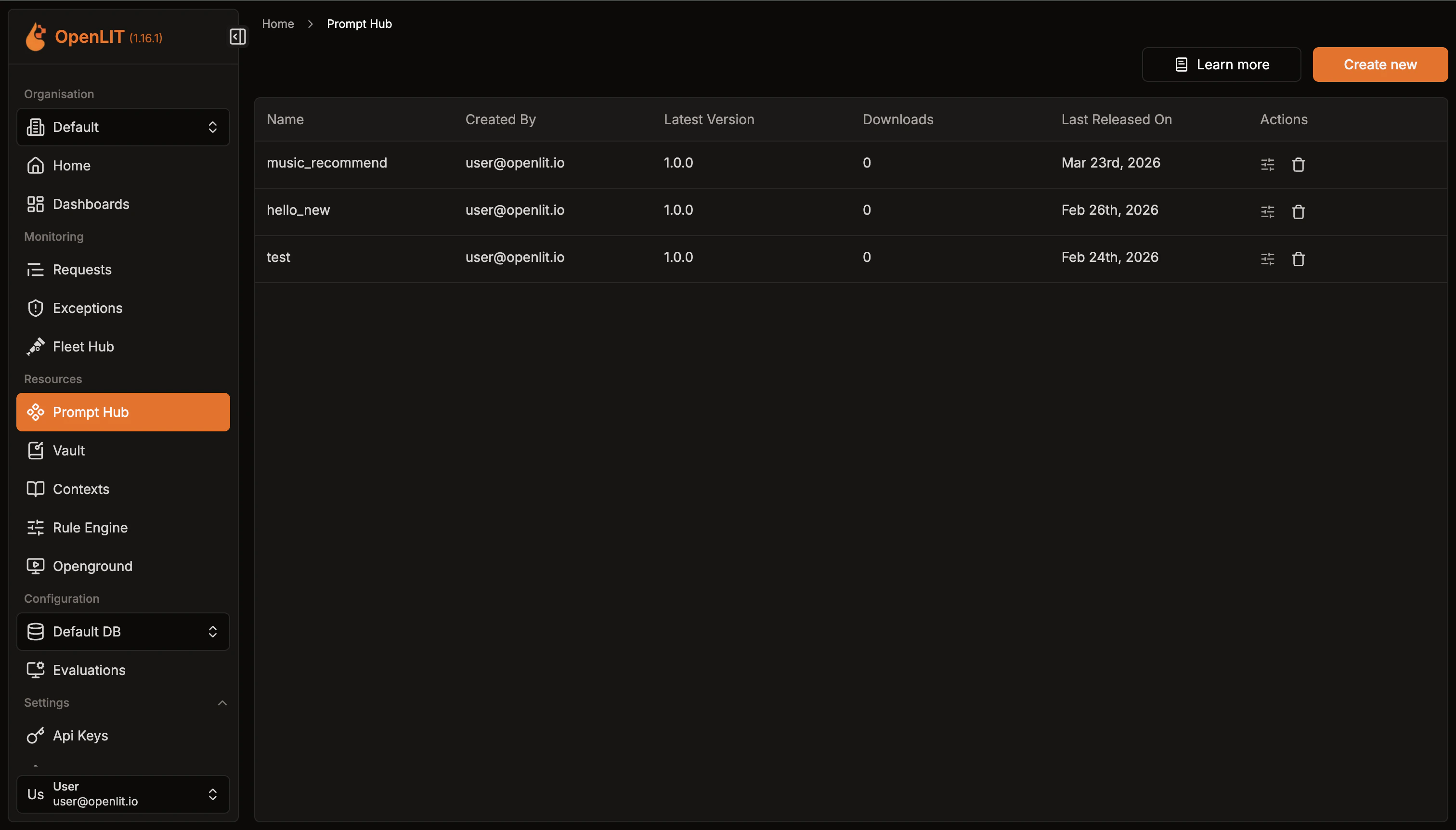
Get a quick overview of all prompts created.
1. Navigate to the Prompt Hub in OpenLIT.
2. Explore the available prompts listed.
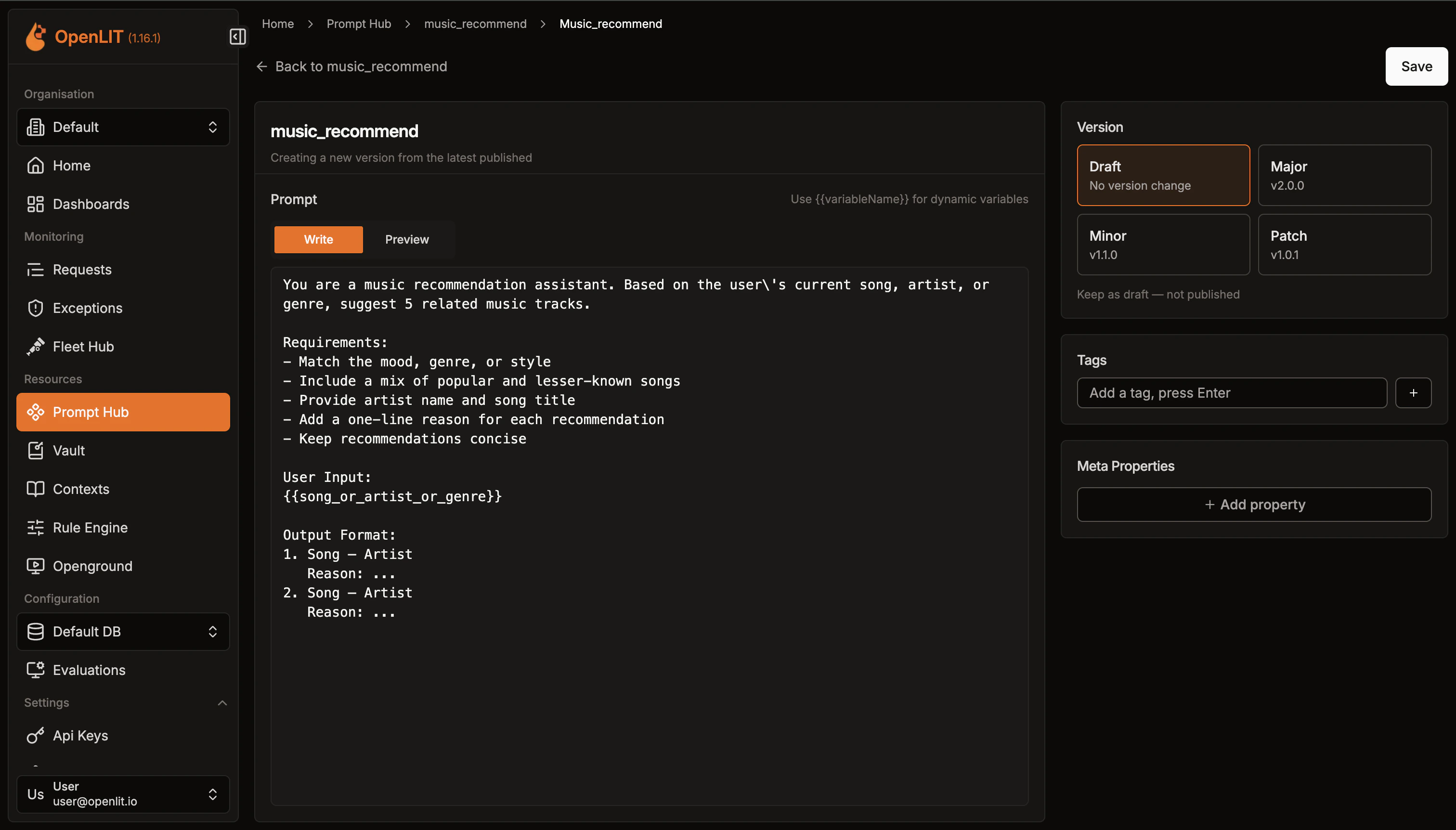
 Build new prompts or edit existing ones with ease.
1. Click on **Create new** button to create a new prompt
2. In the prompt editor, add the prompt name, Meta Properties and use placeholders like `{{variableName}}` to represent dynamic data that will be substituted when the prompt is compiled.
3. Specify major, minor, or patch updates for versioning as you create or modify prompts.
4. Click the Otter action next to the prompt editor to review and improve the prompt before saving.
Build new prompts or edit existing ones with ease.
1. Click on **Create new** button to create a new prompt
2. In the prompt editor, add the prompt name, Meta Properties and use placeholders like `{{variableName}}` to represent dynamic data that will be substituted when the prompt is compiled.
3. Specify major, minor, or patch updates for versioning as you create or modify prompts.
4. Click the Otter action next to the prompt editor to review and improve the prompt before saving.
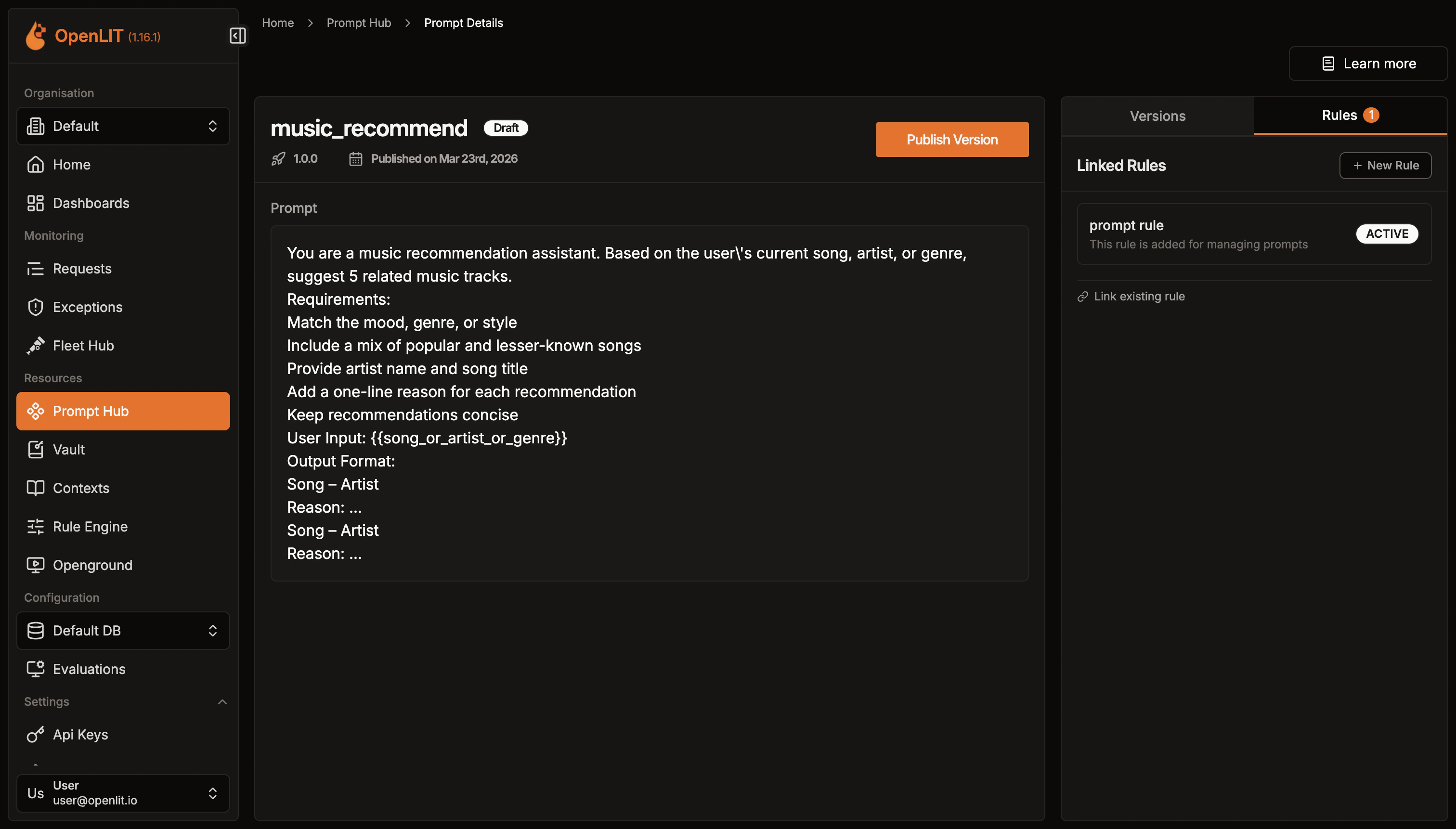
 Once the prompt is creaetd, You can see information about the prompt along with details on all past versions.
 To authenticate your requests, you need an API key. Here's how you can create one:
* Go to the OpenLIT.
* Navigate to the **API Keys** page.
* Click on **Create API Key**.
* Enter a name for your API key.
* Save the API key displayed. Ensure you store it securely as it will be used for authentication in the SDK.
Here's how you can fetch and compile a prompt in Python:
```python theme={null}
import openlit
response = openlit.get_prompt(
url="http://127.0.0.1:3000",
api_key="_OPENLIT_API_KEY",
name="prompt_name",
should_compile=True,
variables={
"name": "John",
},
)
print(response)
```
```shell Output theme={null}
{
err: null,
res: {
promptId: '88c4cbcd-87f9-4957-a37b-b41066e17471',
name: 'prompt_name',
version: '3.3.3',
tags: [ 'user', 'greeting' ],
metaProperties: { model: 'gpt4' },
prompt: 'Hello {{name}}, how are you today?',
compiledPrompt: 'Hello John, how are you today?'
}
}
```
### SDK parameters
Below are the parameters for use with the SDK, formatted to indicate whether each is required or optional:
| Parameter | Description |
| ----------------- | ---------------------------------------------------------------------------------------------- |
| `url` | Sets the OpenLIT URL. Defaults to the `OPENLIT_URL` environment variable. |
| `api_key` | Sets the OpenLIT API Key. Can also be provided via the `OPENLIT_API_KEY` environment variable. |
| `name` | Sets the name to fetch a unique prompt. Use this or `prompt_id`. |
| `prompt_id` | Sets the ID to fetch a unique prompt. Use this or `name`. Optional |
| `version` | Set to `True` to get the prompt with variable substitution.. Optional |
| `shouldCompile` | Boolean value that compiles the prompt using the provided variables. Optional |
| `variables` | Sets the variables for prompt compilation. Optional |
| `meta_properties` | Sets the meta-properties for storing in the prompt's access history metadata. Optional |
Here's how you can fetch and compile a prompt in Typescript/Javascript:
```typescript theme={null}
import Openlit from 'openlit'; // Import OpenLIT
const response = await Openlit.getPrompts({
name: "prompt_name", // Fetch the prompt by name
shouldCompile: true, // Compile the prompt with provided variables
variables: {
name: "John", // Pass variables for prompt compilation
}
});
console.log(response); // Print or process the fetched and compiled prompt
```
```shell Output theme={null}
{
err: null,
res: {
promptId: '88c4cbcd-87f9-4957-a37b-b41066e17471',
name: 'prompt_name',
version: '3.3.3',
tags: [ 'user', 'greeting' ],
metaProperties: { model: 'gpt4' },
prompt: 'Hello {{name}}, how are you today?',
compiledPrompt: 'Hello John, how are you today?'
}
}
```
### SDK parameters
Below are the parameters for use with the SDK, formatted to indicate whether each is required or optional:
| Parameter | Description |
| ---------------- | --------------------------------------------------------------------------------------------------------------- |
| `url` | Sets the OpenLIT URL. Defaults to the `OPENLIT_URL` environment variable or `http://127.0.0.1:3000` if not set. |
| `apiKey` | Sets the OpenLIT API Key. Can also be provided via the `OPENLIT_API_KEY` environment variable. |
| `name` | Sets the name to fetch a unique prompt. Use this or `promptId`. |
| `promptId` | Sets the ID to fetch a unique prompt. Use this or `name`. Optional |
| `version` | Sets the version to retrieve a specific prompt. Optional |
| `shouldCompile` | Boolean value that compiles the prompt using the provided variables. Optional |
| `variables` | Sets the variables for prompt compilation. Optional |
| `metaProperties` | Sets the meta-properties for storing in the prompt's access history metadata. |
To retrieve the prompt via an API request, Refer to the [**GET Prompt**](/latest/openlit/developer-resources/api-reference/endpoint/prompt-hub/get) API Reference Documentation.
## AI prompt improvement
Prompt Hub includes an inline Otter assistant for prompt review. It helps you improve prompt wording while keeping control over what is saved.
Use prompt improvement when you want to:
* Remove redundant wording and make the prompt more concise.
* Make instructions easier to scan and follow.
* Preserve variables such as `{{userInput}}` or `{{context}}` exactly.
* Clarify output format, constraints, and success criteria.
* Reduce ambiguity without changing the prompt's original intent.
### How it works
1. Open a prompt in create or edit mode.
2. Click the Otter action next to the prompt editor.
3. Review the default improvement dimensions, remove any that are not relevant, or add your own.
4. Run the prompt analysis.
5. Review inline suggestions in the editor.
6. Accept or decline each suggestion.
7. Save the prompt or create a new version when you are ready.
Suggestions are local to the editor until you accept them and save the prompt. On the new prompt screen, prior improvement runs are not attached to the prompt history until the prompt itself is saved.
Otter usage for prompt improvement is tracked in Otter usage reports, but review-only prompt improvement does not create normal chat conversation history.
### Improve prompts from Otter chat
You can also ask Otter to review an existing Prompt Hub prompt by name or ID:
```
"Can you help me improve prompt with prompt name music_recommend?"
"Review prompt customer_summary for clarity and concision"
"Suggest better output-format instructions for prompt_id "
```
For review-only requests, Otter loads the prompt and suggests improvements without updating the saved version. It only saves changes when you explicitly ask it to save, apply, update, publish, or create a new version.
***
Centrally store LLM API keys that applications can retrieve remotely without restarts
Create custom visualizations with flexible widgets, queries, and real-time AI monitoring
Compare cost, duration, and response tokens across different LLMs to find the most efficient model
Discover and instrument LLM traffic across Kubernetes, Docker, and Linux using eBPF — no code changes required.
To authenticate your requests, you need an API key. Here's how you can create one:
* Go to the OpenLIT.
* Navigate to the **API Keys** page.
* Click on **Create API Key**.
* Enter a name for your API key.
* Save the API key displayed. Ensure you store it securely as it will be used for authentication in the SDK.
Here's how you can fetch and compile a prompt in Python:
```python theme={null}
import openlit
response = openlit.get_prompt(
url="http://127.0.0.1:3000",
api_key="_OPENLIT_API_KEY",
name="prompt_name",
should_compile=True,
variables={
"name": "John",
},
)
print(response)
```
```shell Output theme={null}
{
err: null,
res: {
promptId: '88c4cbcd-87f9-4957-a37b-b41066e17471',
name: 'prompt_name',
version: '3.3.3',
tags: [ 'user', 'greeting' ],
metaProperties: { model: 'gpt4' },
prompt: 'Hello {{name}}, how are you today?',
compiledPrompt: 'Hello John, how are you today?'
}
}
```
### SDK parameters
Below are the parameters for use with the SDK, formatted to indicate whether each is required or optional:
| Parameter | Description |
| ----------------- | ---------------------------------------------------------------------------------------------- |
| `url` | Sets the OpenLIT URL. Defaults to the `OPENLIT_URL` environment variable. |
| `api_key` | Sets the OpenLIT API Key. Can also be provided via the `OPENLIT_API_KEY` environment variable. |
| `name` | Sets the name to fetch a unique prompt. Use this or `prompt_id`. |
| `prompt_id` | Sets the ID to fetch a unique prompt. Use this or `name`. Optional |
| `version` | Set to `True` to get the prompt with variable substitution.. Optional |
| `shouldCompile` | Boolean value that compiles the prompt using the provided variables. Optional |
| `variables` | Sets the variables for prompt compilation. Optional |
| `meta_properties` | Sets the meta-properties for storing in the prompt's access history metadata. Optional |
Here's how you can fetch and compile a prompt in Typescript/Javascript:
```typescript theme={null}
import Openlit from 'openlit'; // Import OpenLIT
const response = await Openlit.getPrompts({
name: "prompt_name", // Fetch the prompt by name
shouldCompile: true, // Compile the prompt with provided variables
variables: {
name: "John", // Pass variables for prompt compilation
}
});
console.log(response); // Print or process the fetched and compiled prompt
```
```shell Output theme={null}
{
err: null,
res: {
promptId: '88c4cbcd-87f9-4957-a37b-b41066e17471',
name: 'prompt_name',
version: '3.3.3',
tags: [ 'user', 'greeting' ],
metaProperties: { model: 'gpt4' },
prompt: 'Hello {{name}}, how are you today?',
compiledPrompt: 'Hello John, how are you today?'
}
}
```
### SDK parameters
Below are the parameters for use with the SDK, formatted to indicate whether each is required or optional:
| Parameter | Description |
| ---------------- | --------------------------------------------------------------------------------------------------------------- |
| `url` | Sets the OpenLIT URL. Defaults to the `OPENLIT_URL` environment variable or `http://127.0.0.1:3000` if not set. |
| `apiKey` | Sets the OpenLIT API Key. Can also be provided via the `OPENLIT_API_KEY` environment variable. |
| `name` | Sets the name to fetch a unique prompt. Use this or `promptId`. |
| `promptId` | Sets the ID to fetch a unique prompt. Use this or `name`. Optional |
| `version` | Sets the version to retrieve a specific prompt. Optional |
| `shouldCompile` | Boolean value that compiles the prompt using the provided variables. Optional |
| `variables` | Sets the variables for prompt compilation. Optional |
| `metaProperties` | Sets the meta-properties for storing in the prompt's access history metadata. |
To retrieve the prompt via an API request, Refer to the [**GET Prompt**](/latest/openlit/developer-resources/api-reference/endpoint/prompt-hub/get) API Reference Documentation.
## AI prompt improvement
Prompt Hub includes an inline Otter assistant for prompt review. It helps you improve prompt wording while keeping control over what is saved.
Use prompt improvement when you want to:
* Remove redundant wording and make the prompt more concise.
* Make instructions easier to scan and follow.
* Preserve variables such as `{{userInput}}` or `{{context}}` exactly.
* Clarify output format, constraints, and success criteria.
* Reduce ambiguity without changing the prompt's original intent.
### How it works
1. Open a prompt in create or edit mode.
2. Click the Otter action next to the prompt editor.
3. Review the default improvement dimensions, remove any that are not relevant, or add your own.
4. Run the prompt analysis.
5. Review inline suggestions in the editor.
6. Accept or decline each suggestion.
7. Save the prompt or create a new version when you are ready.
Suggestions are local to the editor until you accept them and save the prompt. On the new prompt screen, prior improvement runs are not attached to the prompt history until the prompt itself is saved.
Otter usage for prompt improvement is tracked in Otter usage reports, but review-only prompt improvement does not create normal chat conversation history.
### Improve prompts from Otter chat
You can also ask Otter to review an existing Prompt Hub prompt by name or ID:
```
"Can you help me improve prompt with prompt name music_recommend?"
"Review prompt customer_summary for clarity and concision"
"Suggest better output-format instructions for prompt_id "
```
For review-only requests, Otter loads the prompt and suggests improvements without updating the saved version. It only saves changes when you explicitly ask it to save, apply, update, publish, or create a new version.
***
Centrally store LLM API keys that applications can retrieve remotely without restarts
Create custom visualizations with flexible widgets, queries, and real-time AI monitoring
Compare cost, duration, and response tokens across different LLMs to find the most efficient model
Discover and instrument LLM traffic across Kubernetes, Docker, and Linux using eBPF — no code changes required.