> ## Documentation Index
> Fetch the complete documentation index at: https://docs.openlit.io/llms.txt
> Use this file to discover all available pages before exploring further.
# Context
> Store and manage reusable contextual content that can be linked to rules and retrieved at runtime
Context lets you store rich, reusable content — such as system prompts, knowledge snippets, policy documents, or any markdown text — and associate it with rules in the Rule Engine. When a rule matches at evaluation time, the linked context data is returned alongside the result, ready to be injected into your AI pipeline.
## Key features
* **Markdown content**: Write and preview context content in a full Write/Preview markdown editor.
* **Tags**: Categorise contexts with free-form tags for easy filtering and discovery.
* **Meta properties**: Attach arbitrary key-value metadata to contexts (e.g. `model: gpt-4`, `region: us`).
* **Status control**: Mark contexts as **Active** or **Inactive** to enable or disable them without deletion.
* **Rule linking**: Associate contexts with one or more rules. When a rule matches, linked context content is returned in the evaluate API response.
## Get started
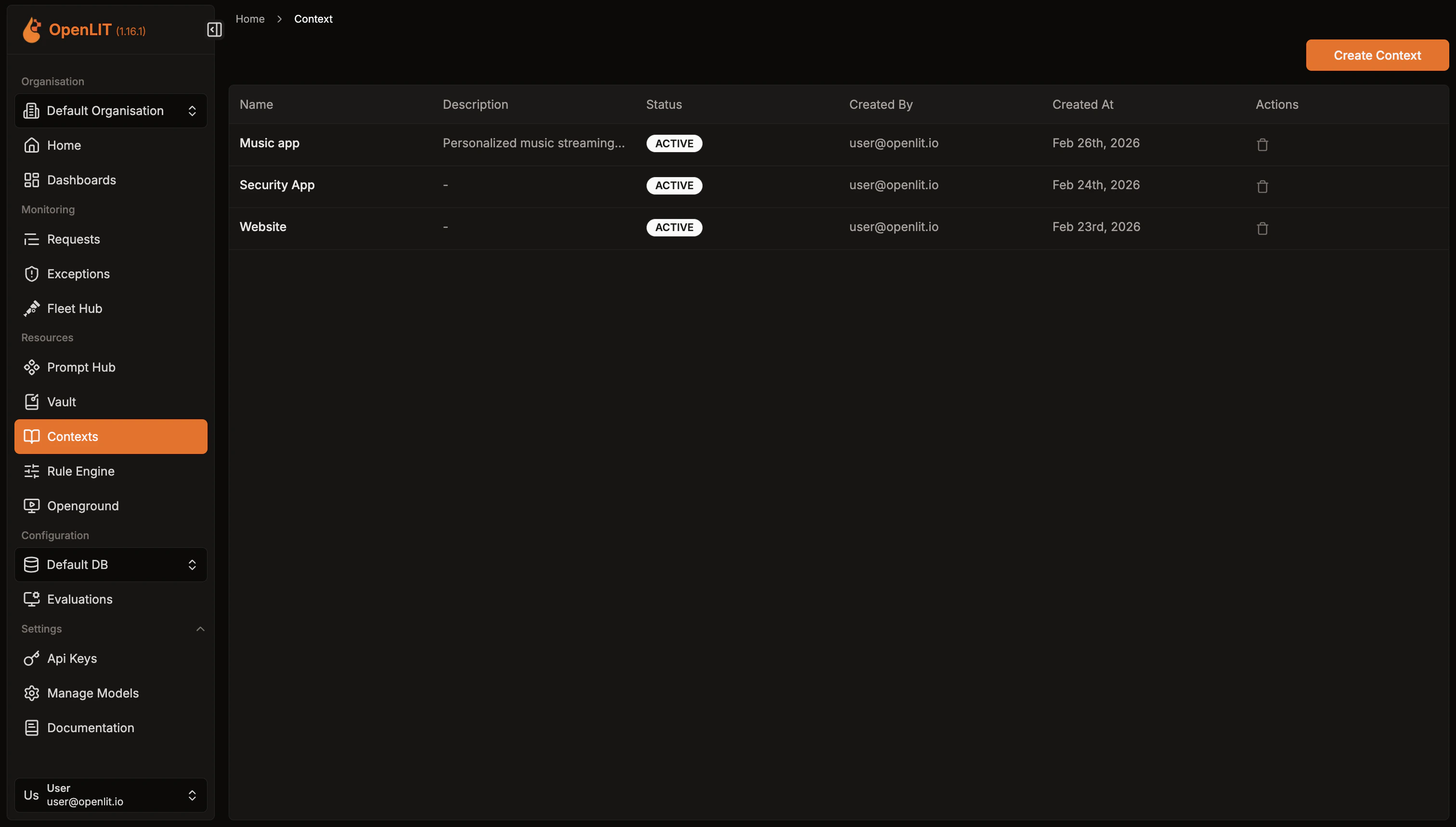 Get an overview of all contexts created.
1. Navigate to **Context** in the OpenLIT sidebar.
2. Browse the list of existing contexts with their status and description.
1. Click **Create Context** in the top-right corner.
2. Enter a **Name** (required) and an optional **Description**.
3. Write your content in the **Content** editor. Markdown is fully supported — switch to **Preview** to see the rendered output.
4. On the right panel:
* Set the **Status** to *Active* or *Inactive*.
* Add **Tags** by typing and pressing Enter.
* Add **Meta Properties** as key-value pairs for additional metadata.
5. Click **Save Context**. You will be redirected to the context detail page.
Get an overview of all contexts created.
1. Navigate to **Context** in the OpenLIT sidebar.
2. Browse the list of existing contexts with their status and description.
1. Click **Create Context** in the top-right corner.
2. Enter a **Name** (required) and an optional **Description**.
3. Write your content in the **Content** editor. Markdown is fully supported — switch to **Preview** to see the rendered output.
4. On the right panel:
* Set the **Status** to *Active* or *Inactive*.
* Add **Tags** by typing and pressing Enter.
* Add **Meta Properties** as key-value pairs for additional metadata.
5. Click **Save Context**. You will be redirected to the context detail page.
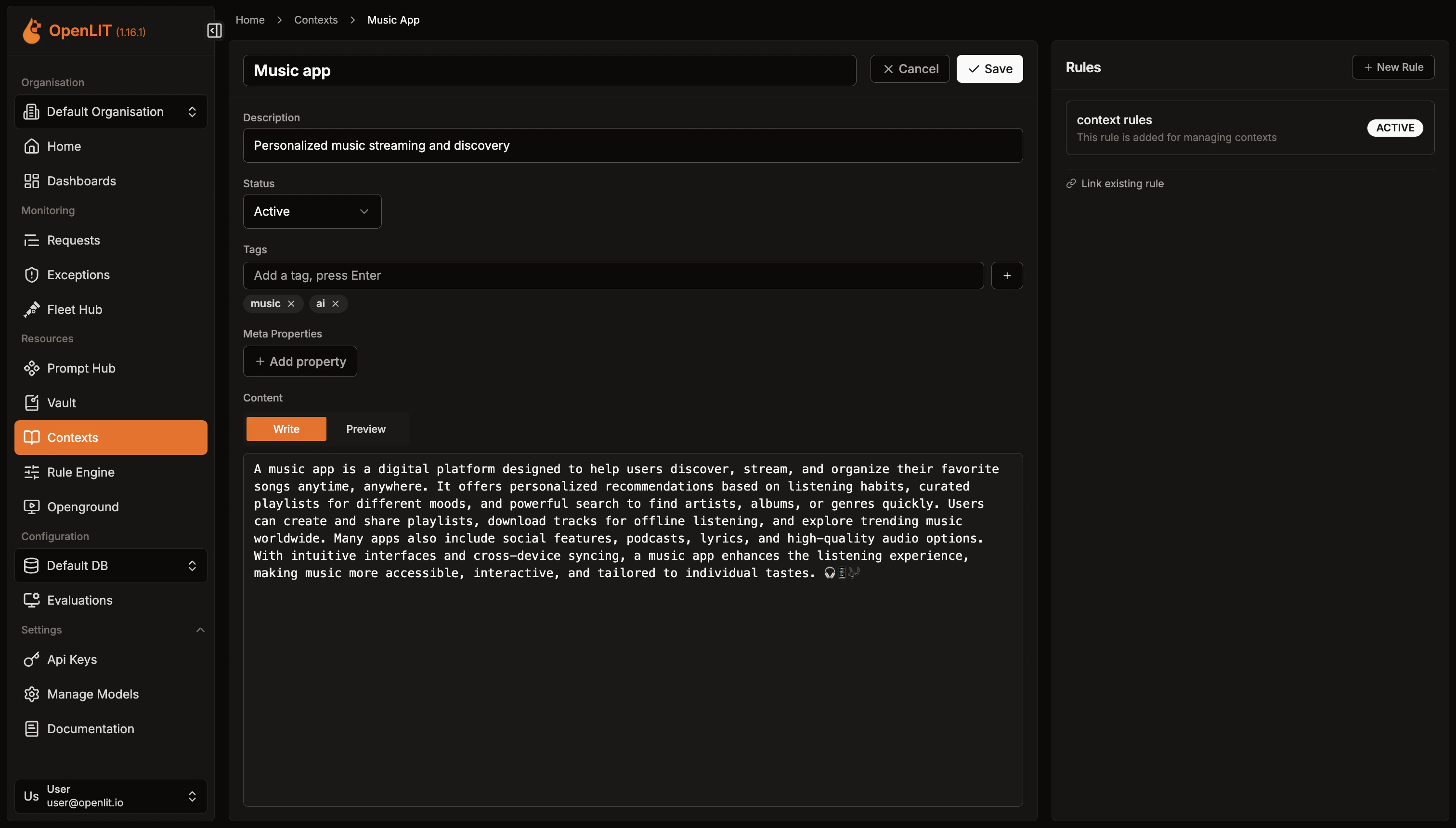 1. Click on any context in the list to open its detail page.
2. Click **Edit** to switch to edit mode.
3. Modify any fields — name, description, content, status, tags, or meta properties.
4. Click **Save** to apply changes.
Contexts become actionable when linked to rules.
1. Open the context detail page.
2. In the **Linked Rules** panel on the right, click **New Rule** to create and link a new rule, or use **Link existing rule** to associate an existing rule.
3. Linked rules are listed with their name and status. Click a rule name to navigate to its detail page.
Alternatively, from the Context list page, click the **rule icon** (⧉) on any row to quickly create a rule linked to that context.
Use the Rule Engine evaluate API to fetch matching context data for your AI pipeline.
* Navigate to **Settings → API Keys** in OpenLIT.
* Click **Create API Key**, enter a name, and save the key securely.
Send a `POST` request to `/api/rule-engine/evaluate` with your input fields and `entity_type: "context"` using the SDK or curl.
```python theme={null}
import openlit
result = openlit.evaluate_rule(
entity_type="context",
fields={"model": "gpt-4", "user_tier": "premium"},
include_entity_data=True,
)
if result:
for entity in result.get("entities", []):
key = f"context:{entity['entity_id']}"
data = result.get("entity_data", {}).get(key, {})
print(f"Context: {data.get('name')}")
print(f"Content: {data.get('content')}")
```
```typescript theme={null}
import Openlit from 'openlit';
const result = await Openlit.evaluateRule({
entityType: 'context',
fields: { model: 'gpt-4', user_tier: 'premium' },
includeEntityData: true,
});
if (!('err' in result)) {
for (const entity of result.entities) {
const key = `context:${entity.entity_id}`;
const data = result.entity_data?.[key];
console.log('Context:', data?.name);
console.log('Content:', data?.content);
}
}
```
```go theme={null}
result, err := openlit.EvaluateRule(ctx, openlit.EvaluateRuleOptions{
EntityType: openlit.RuleEntityContext,
Fields: map[string]interface{}{"model": "gpt-4", "user_tier": "premium"},
IncludeEntityData: true,
})
if err != nil {
log.Fatal(err)
}
for _, entity := range result.Entities {
key := fmt.Sprintf("context:%s", entity.EntityID)
fmt.Printf("Context data: %v\n", result.EntityData[key])
}
```
```bash theme={null}
curl -X POST https://your-openlit-instance/api/rule-engine/evaluate \
-H "Authorization: Bearer YOUR_API_KEY" \
-H "Content-Type: application/json" \
-d '{
"entity_type": "context",
"fields": {
"model": "gpt-4",
"user_tier": "premium"
},
"include_entity_data": true
}'
```
```json Example Response theme={null}
{
"matchingRuleIds": ["rule-uuid-1"],
"entities": [
{
"rule_id": "rule-uuid-1",
"entity_type": "context",
"entity_id": "context-uuid-1"
}
],
"entity_data": {
"context:context-uuid-1": {
"id": "context-uuid-1",
"name": "Premium System Prompt",
"content": "You are a helpful AI assistant for premium users...",
"tags": "[\"premium\",\"system\"]",
"status": "ACTIVE"
}
}
}
```
Set `include_entity_data: true` to receive the full context record. When omitted, only matching rule IDs and entity references are returned.
For detailed SDK parameters and error handling, see the [SDK Rule Engine docs](/latest/sdk/features/rule-engine).
1. Open the context detail page.
2. Click the **Delete** button.
3. Confirm deletion. This action is permanent.
***
Create conditional rules to match inputs and retrieve linked contexts, prompts, and other resources
Version, deploy, and collaborate on prompts with centralized management and tracking
Use evaluate\_rule() from Python, TypeScript, or Go with full parameter reference
Full reference for the Rule Engine evaluate endpoint with request and response schemas
1. Click on any context in the list to open its detail page.
2. Click **Edit** to switch to edit mode.
3. Modify any fields — name, description, content, status, tags, or meta properties.
4. Click **Save** to apply changes.
Contexts become actionable when linked to rules.
1. Open the context detail page.
2. In the **Linked Rules** panel on the right, click **New Rule** to create and link a new rule, or use **Link existing rule** to associate an existing rule.
3. Linked rules are listed with their name and status. Click a rule name to navigate to its detail page.
Alternatively, from the Context list page, click the **rule icon** (⧉) on any row to quickly create a rule linked to that context.
Use the Rule Engine evaluate API to fetch matching context data for your AI pipeline.
* Navigate to **Settings → API Keys** in OpenLIT.
* Click **Create API Key**, enter a name, and save the key securely.
Send a `POST` request to `/api/rule-engine/evaluate` with your input fields and `entity_type: "context"` using the SDK or curl.
```python theme={null}
import openlit
result = openlit.evaluate_rule(
entity_type="context",
fields={"model": "gpt-4", "user_tier": "premium"},
include_entity_data=True,
)
if result:
for entity in result.get("entities", []):
key = f"context:{entity['entity_id']}"
data = result.get("entity_data", {}).get(key, {})
print(f"Context: {data.get('name')}")
print(f"Content: {data.get('content')}")
```
```typescript theme={null}
import Openlit from 'openlit';
const result = await Openlit.evaluateRule({
entityType: 'context',
fields: { model: 'gpt-4', user_tier: 'premium' },
includeEntityData: true,
});
if (!('err' in result)) {
for (const entity of result.entities) {
const key = `context:${entity.entity_id}`;
const data = result.entity_data?.[key];
console.log('Context:', data?.name);
console.log('Content:', data?.content);
}
}
```
```go theme={null}
result, err := openlit.EvaluateRule(ctx, openlit.EvaluateRuleOptions{
EntityType: openlit.RuleEntityContext,
Fields: map[string]interface{}{"model": "gpt-4", "user_tier": "premium"},
IncludeEntityData: true,
})
if err != nil {
log.Fatal(err)
}
for _, entity := range result.Entities {
key := fmt.Sprintf("context:%s", entity.EntityID)
fmt.Printf("Context data: %v\n", result.EntityData[key])
}
```
```bash theme={null}
curl -X POST https://your-openlit-instance/api/rule-engine/evaluate \
-H "Authorization: Bearer YOUR_API_KEY" \
-H "Content-Type: application/json" \
-d '{
"entity_type": "context",
"fields": {
"model": "gpt-4",
"user_tier": "premium"
},
"include_entity_data": true
}'
```
```json Example Response theme={null}
{
"matchingRuleIds": ["rule-uuid-1"],
"entities": [
{
"rule_id": "rule-uuid-1",
"entity_type": "context",
"entity_id": "context-uuid-1"
}
],
"entity_data": {
"context:context-uuid-1": {
"id": "context-uuid-1",
"name": "Premium System Prompt",
"content": "You are a helpful AI assistant for premium users...",
"tags": "[\"premium\",\"system\"]",
"status": "ACTIVE"
}
}
}
```
Set `include_entity_data: true` to receive the full context record. When omitted, only matching rule IDs and entity references are returned.
For detailed SDK parameters and error handling, see the [SDK Rule Engine docs](/latest/sdk/features/rule-engine).
1. Open the context detail page.
2. Click the **Delete** button.
3. Confirm deletion. This action is permanent.
***
Create conditional rules to match inputs and retrieve linked contexts, prompts, and other resources
Version, deploy, and collaborate on prompts with centralized management and tracking
Use evaluate\_rule() from Python, TypeScript, or Go with full parameter reference
Full reference for the Rule Engine evaluate endpoint with request and response schemas