> ## Documentation Index
> Fetch the complete documentation index at: https://docs.openlit.io/llms.txt
> Use this file to discover all available pages before exploring further.
# Vault
> Store and access sensitive information like LLM API keys securely
Vault is designed to securely store and access sensitive information, such as API keys (e.g., `OPENAI_API_TOKEN`), eliminating the need to directly embed them in your code or environment variables. This centralized approach ensures that all developers can securely share and use the same API key without the necessity of distributing individual keys.
## Key features
* **Secrets Management**: Seamlessly create, edit, and monitor the secrets associated with your applications.
* **Secure Access**: Retrieve secrets based on keys or tags, and safely integrate them into your Node.js or Python environments.
* **Encrypted Storage**: Vault values are encrypted at rest with AES-256-GCM before they are stored.
## Security and cross-origin access
Vault secret retrieval uses API-key authentication and can be called from SDKs, REST clients, and server-side applications. Browser-based cross-origin calls are additionally restricted by CORS.
If your application is hosted on a different domain from OpenLIT and calls `POST /api/vault/get-secrets` from the browser, add the application origin to `OPENLIT_ALLOWED_CORS_ORIGINS`:
```bash theme={null}
OPENLIT_ALLOWED_CORS_ORIGINS="https://app.example.com"
```
Multiple origins can be comma-separated:
```bash theme={null}
OPENLIT_ALLOWED_CORS_ORIGINS="https://app.example.com,https://admin.example.com"
```
Server-to-server SDK and REST calls usually do not require CORS configuration because CORS is enforced by browsers. Do not use wildcard origins for secret retrieval endpoints.
Vault values are encrypted with `OPENLIT_VAULT_ENCRYPTION_KEY`, or `NEXTAUTH_SECRET` if no dedicated Vault key is set. Keep the encryption key stable so existing secrets remain decryptable.
## Get started
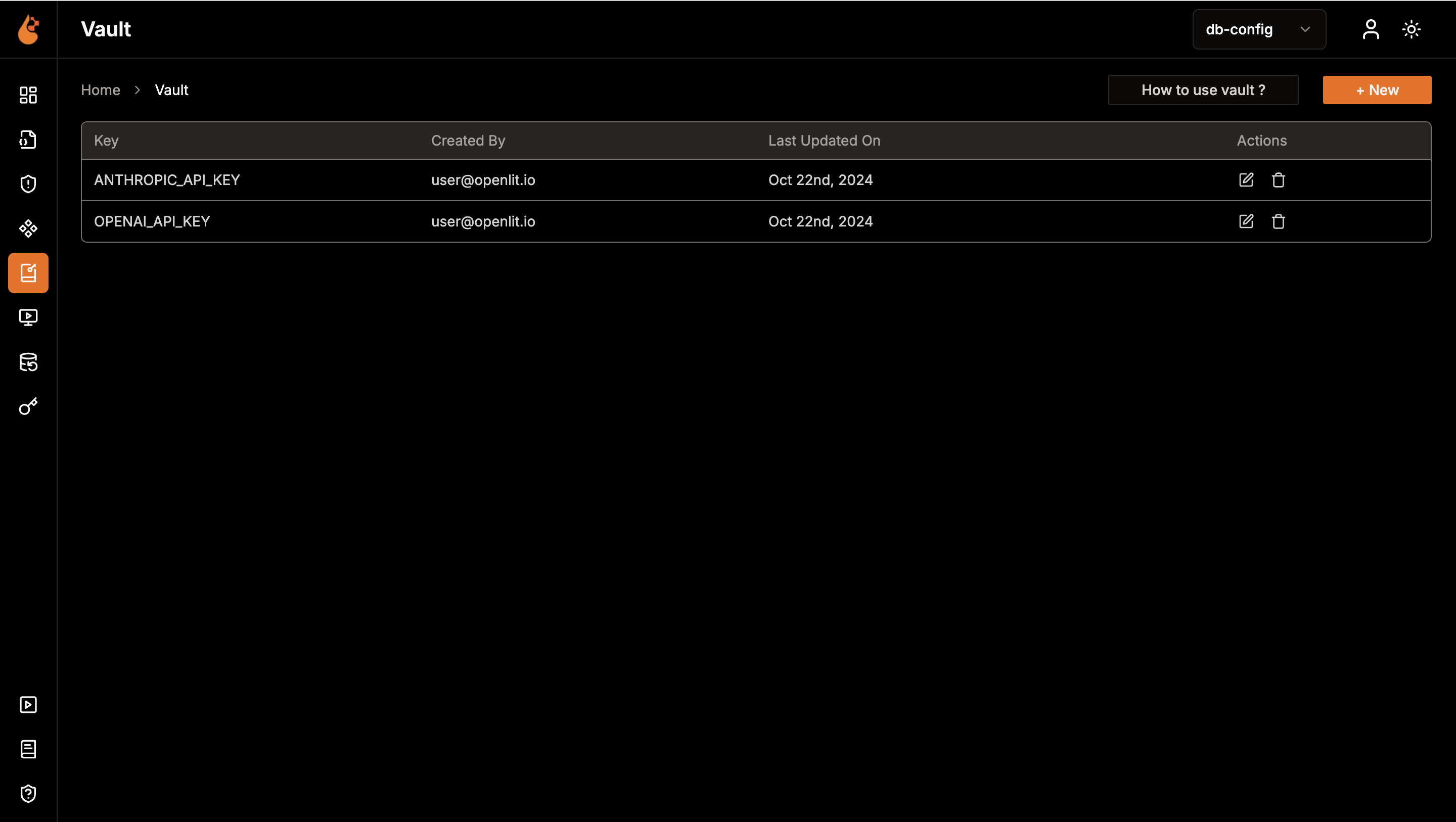
Get a quick overview of all secrets created.
1. Navigate to the Vault in OpenLIT.
2. Explore the available secrets listed.
 Build new secret with ease.
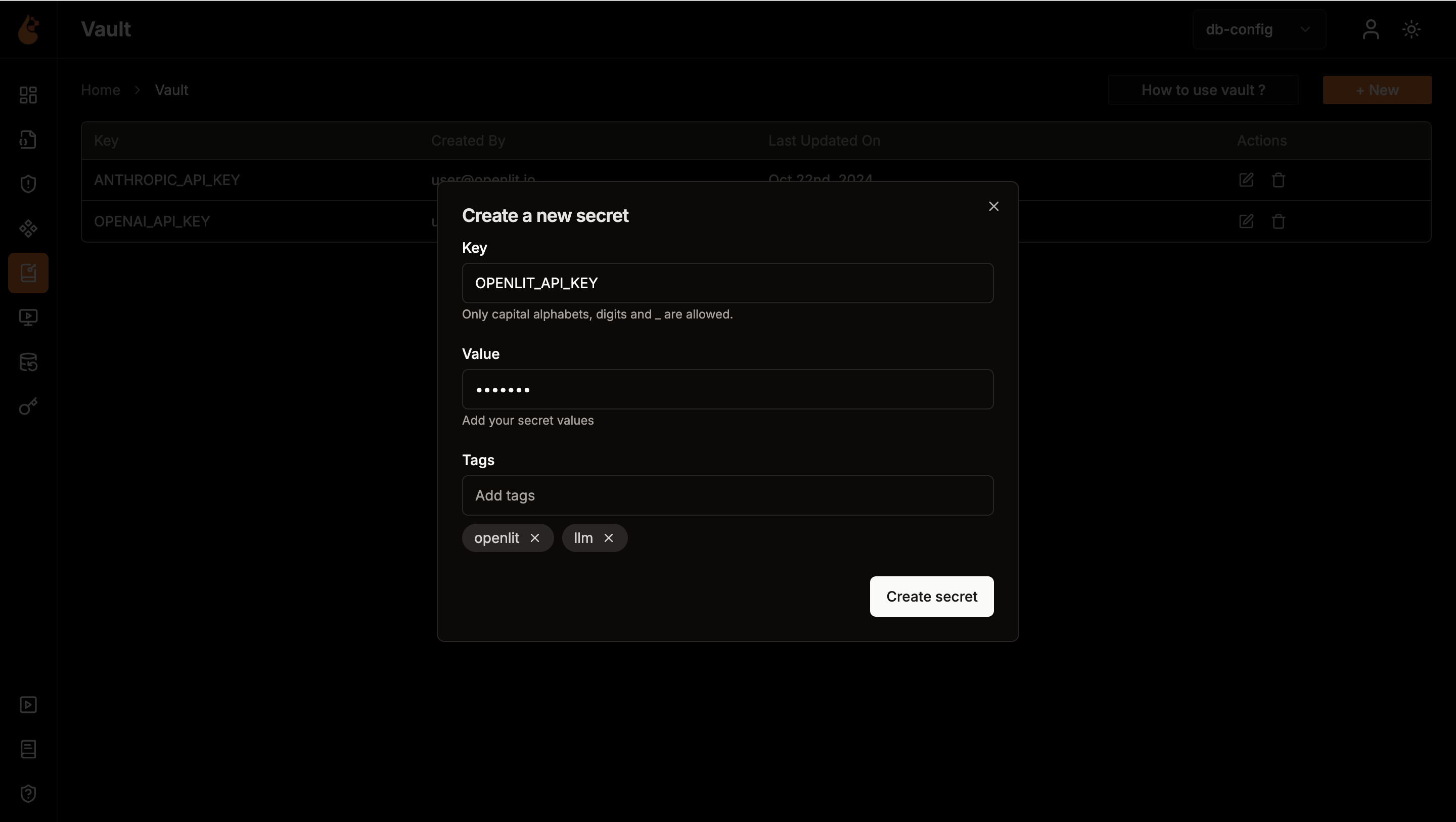
1. Click on **Create new** button to create a new secret
2. In the secret form, add the secret key, secret value and add tags to easily manage and access the secrets via sdk.
Build new secret with ease.
1. Click on **Create new** button to create a new secret
2. In the secret form, add the secret key, secret value and add tags to easily manage and access the secrets via sdk.
 To authenticate your requests, you need an API key. Here's how you can create one:
* Go to the OpenLIT.
* Navigate to the **API Keys** page.
* Click on **Create API Key**.
* Enter a name for your API key.
* Save the API key displayed. Ensure you store it securely as it will be used for authentication in the SDK.
Here's how you can fetch and set environment secret(s) in Python:
```python theme={null}
import openlit
response = openlit.get_secrets(
url="http://127.0.0.1:3000",
api_key="_OPENLIT_API_KEY",
should_set_env=True
)
print(response)
```
```shell Output theme={null}
{
err: null,
res: { ANTHROPIC_API_KEY: 'ANTHROPIC_API_VALUE', OPENAI_API_KEY: 'OPENAI_API_VALUE' }
}
```
### SDK parameters
Below are the parameters for use with the SDK, formatted to indicate whether each is required or optional:
| Parameter | Description |
| ---------------- | ---------------------------------------------------------------------------------------------- |
| `url` | Sets the Openlit URL. Defaults to the `OPENLIT_URL` environment variable. |
| `api_key` | Sets the OpenLIT API Key. Can also be provided via the `OPENLIT_API_KEY` environment variable. |
| `key` | Sets the key to fetch a specific secret. Optional |
| `should_set_env` | Boolean value that sets all the secrets as environment variables for the application. Optional |
| `tags` | Sets the tags for fetching only the secrets that have the mentioned tags assigned. Optional |
Here's how you can fetch and compile a prompt in Typescript/Javascript:
```typescript theme={null}
import Openlit from 'openlit'; // Import the Openlit SDK
const response = await Openlit.getSecrets({
shouldSetEnv: true, // Set the secrets as the environment variables for the application
});
console.log(response); // Print or process the fetched and compiled prompt
```
```shell Output theme={null}
{
err: null,
res: { ANTHROPIC_API_KEY: 'ANTHROPIC_API_VALUE', OPENAI_API_KEY: 'OPENAI_API_VALUE' }
}
```
### SDK parameters
Below are the parameters for use with the SDK, formatted to indicate whether each is required or optional:
| Parameter | Description |
| -------------- | --------------------------------------------------------------------------------------------------------------- |
| `url` | Sets the Openlit URL. Defaults to the `OPENLIT_URL` environment variable or `http://127.0.0.1:3000` if not set. |
| `apiKey` | Sets the OpenLIT API Key. Can also be provided via the `OPENLIT_API_KEY` environment variable. |
| `key` | Sets the key to fetch a specific secret. Optional |
| `tags` | Sets the tags for fetching only the secrets that have the mentioned tags assigned. Optional |
| `shouldSetEnv` | Boolean value that sets all the secrets as environment variables for the application. Optional |
To retrieve the secret via an API request, Refer to the [**GET Secret(s)**](/latest/openlit/developer-resources/api-reference/endpoint/vault/get) API Reference Documentation.
***
Create custom visualizations with flexible widgets, queries, and real-time AI monitoring
Version, deploy, and collaborate on prompts with centralized management and tracking
Compare cost, duration, and response tokens across different LLMs to find the most efficient model
To authenticate your requests, you need an API key. Here's how you can create one:
* Go to the OpenLIT.
* Navigate to the **API Keys** page.
* Click on **Create API Key**.
* Enter a name for your API key.
* Save the API key displayed. Ensure you store it securely as it will be used for authentication in the SDK.
Here's how you can fetch and set environment secret(s) in Python:
```python theme={null}
import openlit
response = openlit.get_secrets(
url="http://127.0.0.1:3000",
api_key="_OPENLIT_API_KEY",
should_set_env=True
)
print(response)
```
```shell Output theme={null}
{
err: null,
res: { ANTHROPIC_API_KEY: 'ANTHROPIC_API_VALUE', OPENAI_API_KEY: 'OPENAI_API_VALUE' }
}
```
### SDK parameters
Below are the parameters for use with the SDK, formatted to indicate whether each is required or optional:
| Parameter | Description |
| ---------------- | ---------------------------------------------------------------------------------------------- |
| `url` | Sets the Openlit URL. Defaults to the `OPENLIT_URL` environment variable. |
| `api_key` | Sets the OpenLIT API Key. Can also be provided via the `OPENLIT_API_KEY` environment variable. |
| `key` | Sets the key to fetch a specific secret. Optional |
| `should_set_env` | Boolean value that sets all the secrets as environment variables for the application. Optional |
| `tags` | Sets the tags for fetching only the secrets that have the mentioned tags assigned. Optional |
Here's how you can fetch and compile a prompt in Typescript/Javascript:
```typescript theme={null}
import Openlit from 'openlit'; // Import the Openlit SDK
const response = await Openlit.getSecrets({
shouldSetEnv: true, // Set the secrets as the environment variables for the application
});
console.log(response); // Print or process the fetched and compiled prompt
```
```shell Output theme={null}
{
err: null,
res: { ANTHROPIC_API_KEY: 'ANTHROPIC_API_VALUE', OPENAI_API_KEY: 'OPENAI_API_VALUE' }
}
```
### SDK parameters
Below are the parameters for use with the SDK, formatted to indicate whether each is required or optional:
| Parameter | Description |
| -------------- | --------------------------------------------------------------------------------------------------------------- |
| `url` | Sets the Openlit URL. Defaults to the `OPENLIT_URL` environment variable or `http://127.0.0.1:3000` if not set. |
| `apiKey` | Sets the OpenLIT API Key. Can also be provided via the `OPENLIT_API_KEY` environment variable. |
| `key` | Sets the key to fetch a specific secret. Optional |
| `tags` | Sets the tags for fetching only the secrets that have the mentioned tags assigned. Optional |
| `shouldSetEnv` | Boolean value that sets all the secrets as environment variables for the application. Optional |
To retrieve the secret via an API request, Refer to the [**GET Secret(s)**](/latest/openlit/developer-resources/api-reference/endpoint/vault/get) API Reference Documentation.
***
Create custom visualizations with flexible widgets, queries, and real-time AI monitoring
Version, deploy, and collaborate on prompts with centralized management and tracking
Compare cost, duration, and response tokens across different LLMs to find the most efficient model